---
title: "Control Popup using HTML Attributes - EngageBox"
description: "Would you like to open or close a box by clicking on a link or a button? What about an image or a div? It's easy with HTML attributes! In order to us"
url: "https://www.tassos.gr/docs/engagebox/functionality/html-data-attributes"
date: "2026-05-02T00:38:34+00:00"
language: "en-GB"
---
[ Home ](https://www.tassos.gr/index.php?option=com_content&view=category&layout=blog&id=24&Itemid=1088) / [ EngageBox ](https://www.tassos.gr/index.php?option=com_content&view=category&id=35) / [ Functionality ](https://www.tassos.gr/index.php?option=com_content&view=category&id=52)
# Control Popup using HTML Attributes
Would you like to open or close a box by clicking on a link or a button? What about an image or a div? It's easy with HTML attributes!
In order to use HTML attributes you will need the box's ID and access to your HTML code.
## [Where to find the Box ID?](#where-to-find-the-box-id)
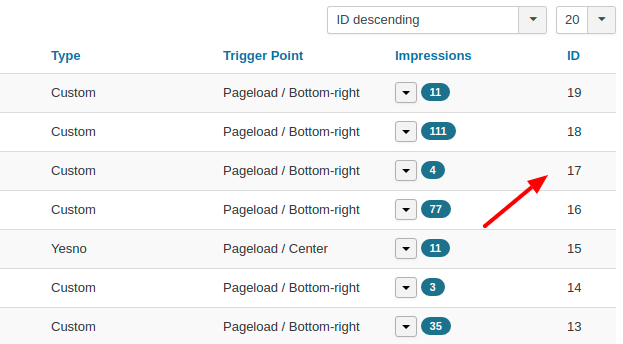
Go to your Components -> EngageBox -> List and look at the last column of the box list. This is your Box's ID.
## [Available Commands](#available-commands)
- open (Show the popup)
- close (Close the popup)
## [Syntax](#syntax)
The syntax is pretty straightforward. Let's see some examples using Box #1.
### [Show Box using a button](#show-box-using-a-button)
```
```
### [Close Box using a div](#close-box-using-a-div)
```
Close me!
```
### [Close Box and Follow Link URL](#close-box-and-follow-link-url)
```
Close and Return to Google.gr
```
### [Toggle Open/Close State](#toggle-open-close-state)
```
Toggle Open/Close State
```
## [Note](#note)
The data-ebox attribute is optional for all elements within a box. EngageBox will try to discover the closest box automatically.
```
```
Last updated on Oct 17th 2025 10:10
## Schema
```json
{
"@context": "https://schema.org",
"@type": "BreadcrumbList",
"itemListElement": [
{
"@type": "ListItem",
"position": 1,
"name": "Home",
"item": "https://www.tassos.gr"
},
{
"@type": "ListItem",
"position": 2,
"name": "Home",
"item": "https://www.tassos.gr/docs"
},
{
"@type": "ListItem",
"position": 3,
"name": "EngageBox",
"item": "https://www.tassos.gr/docs/engagebox"
},
{
"@type": "ListItem",
"position": 4,
"name": "Functionality",
"item": "https://www.tassos.gr/docs/engagebox/functionality"
},
{
"@type": "ListItem",
"position": 5,
"name": "Control Popup using HTML Attributes",
"item": "https://www.tassos.gr/docs/engagebox/functionality/html-data-attributes"
}
]
}
```
```json
{
"@context": "https://schema.org",
"@type": "Article",
"mainEntityOfPage": {
"@type": "WebPage",
"@id": "https://www.tassos.gr/docs/engagebox/functionality/html-data-attributes"
},
"headline": "Control Popup using HTML Attributes",
"image": {
"@type": "ImageObject",
"url": "https://www.tassos.gr/"
},
"publisher": {
"@type": "Organization",
"name": "Tassos",
"logo": {
"@type": "ImageObject",
"url": "https://www.tassos.gr/https://www.tassos.gr/media/brand/logo-text.png"
}
},
"author": {
"@type": "Person",
"name": "Tassos Marinos",
"url": "https://www.tassos.gr/docs/engagebox/functionality/html-data-attributes"
},
"datePublished": "2014-12-03T00:00:00+02:00",
"dateCreated": "2014-12-03T00:00:00+02:00",
"dateModified": "2025-10-17T10:00:18+03:00"
}
```