
Sep - Oct 2025 Product Updates

We are happy to share what we have been building across our Joomla extensions over the last two months. This cycle brings improvements that make your day-to-day work smoother, and we even managed to sneak in a few long-standing UX fixes that many of you have been waiting for.
If you missed our previous updates, you can catch up here: Jul Aug Product Updates and May Jun Product Updates.
- Joomla 6 Support
- Convert Forms
- Password visibility toggle
- Field-to-Field comparisons in Conditional Fields
- Accessible markup for Radio and Checkbox fields
- Unpublished forms appearing in the export selector
- Improved Article Text mapping UI in the Content App
- Fixed timezone offset for {submission.date} Smart Tag in PDF regeneration
- Insert new fields before the Submit button
- Google Structured Data
- EngageBox
- Advanced Custom Fields
- Smile Pack
Joomla 6 Support
All our extensions are now fully compatible with Joomla 6. This new Joomla version focuses on performance improvements, updated libraries, and a cleaner backend experience. It introduces refreshed UI elements, modernized code standards, and improved support for multilingual sites. We reviewed our entire codebase to ensure it plays nicely with Joomla's new APIs and adjusted layouts and styles so everything looks correct in the new environment.
If you are still on Joomla 4 or Joomla 5, there is no pressure to rush your upgrade. All our extensions continue to work across all supported Joomla versions, so you can move to Joomla 6 on your own schedule without breaking anything.
Convert Forms
Our contact form extension for Joomla receives several usability improvements that help both form creators and end users. This cycle delivers quality-of-life enhancements, accessibility improvements, and fixes for long-standing edge cases.
Password visibility toggle
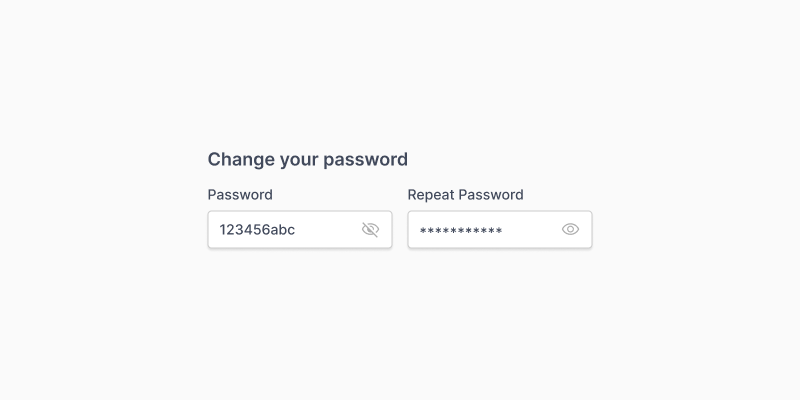
Users often mistype passwords because they cannot see what they are typing. That can be frustrating, especially when there is also a confirmation field.
We added a simple visibility toggle to both the Password and Confirmation fields. It is enabled by default, and it allows users to switch between hidden and visible text while typing. This helps reduce mistakes and lowers form abandonment rates.
Field-to-Field comparisons in Conditional Fields
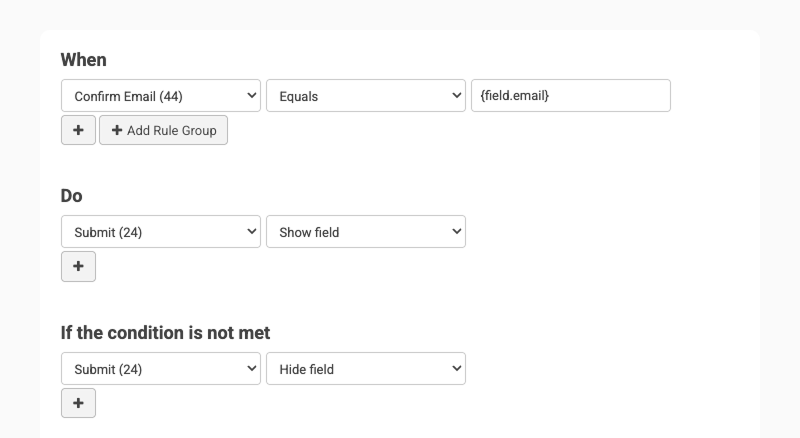
Convert Forms includes Conditional Fields, which let you show or hide fields based on user input. Many users rely on this feature to create smarter forms, for example, showing different questions depending on the chosen country or topic. Until now, Conditional Fields could compare a field only against a fixed value.
This update introduces field to field comparisons using the {field.FIELD_NAME} Smart Tag. You can now compare the value of one field against the live value of another field. This gives your forms much smarter behavior. For example, you can show a field only when two values match, or trigger warnings when one input exceeds another.
This approach also gives you cleaner forms with fewer duplicated values. Instead of typing the same number in multiple conditions, you can reference a single field. When that field changes, all related conditions follow automatically.
Examples of what is now possible:
- Check if a password matches a confirmation field
- Compare Start Date and End Date
- Warn users when Minimum Budget is greater than Maximum Budget
- Build multi step logic based on user input
Accessible markup for Radio and Checkbox fields
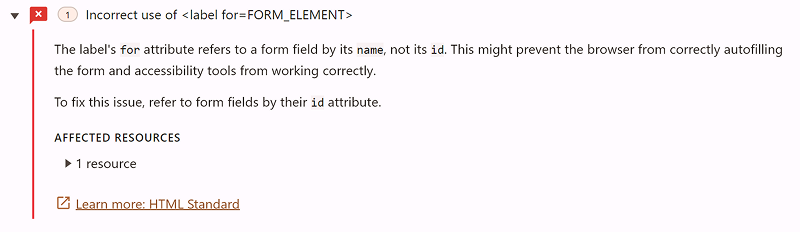
Radio and Checkbox groups in Convert Forms allow you to present multiple options under a single question, which is a very common pattern in Joomla contact forms. Until now, the markup used for these fields could confuse screen readers because the group label was not properly associated with the individual inputs.
This structure could also trigger accessibility warnings in audit tools, including the popular incorrect use of <label for=FORM_ELEMENT> message. While each option had its own label, the group label itself pointed to a non existent ID, which made the overall structure invalid.
We fixed this by switching to a proper <fieldset> container with a <legend> element for the group label, while keeping individual <label> elements for each option. This aligns with accessibility standards and improves the experience for users relying on assistive technologies.
Unpublished forms appearing in the export selector
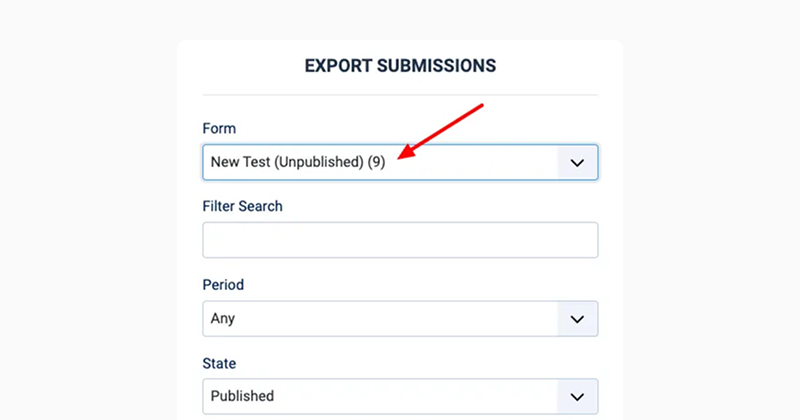
You could view submissions for unpublished forms in the backend, but you could not export them because they did not appear in the export dropdown. This was a small issue that created unnecessary confusion.
Unpublished forms now correctly appear in the export form selector, which allows you to export submissions for both published and unpublished forms.
Improved Article Text mapping UI in the Content App
If you use Convert Forms to generate Joomla articles from form submissions, this update is for you. Many users rely on the Content App to turn form data into new Joomla articles, and mapping fields to article properties is usually quick through the dropdown lists. The Article Text property was the only exception, displaying a rich text editor instead of a dropdown.
This led to confusion. Many users typed {field.NAME} inside the editor, but that did not behave correctly because HTML was sanitized. To keep the original HTML, they actually needed {field.NAME.raw}, which no one naturally guesses.
We updated the UI so the Article Text property now works the same as the other mapping options. You can select a field from a simple dropdown, reducing mistakes and keeping everything consistent. If you still want to write your own custom content, you can pick the Set Custom Content option, and the rich text editor will appear.
Fixed timezone offset for {submission.date} Smart Tag in PDF regeneration
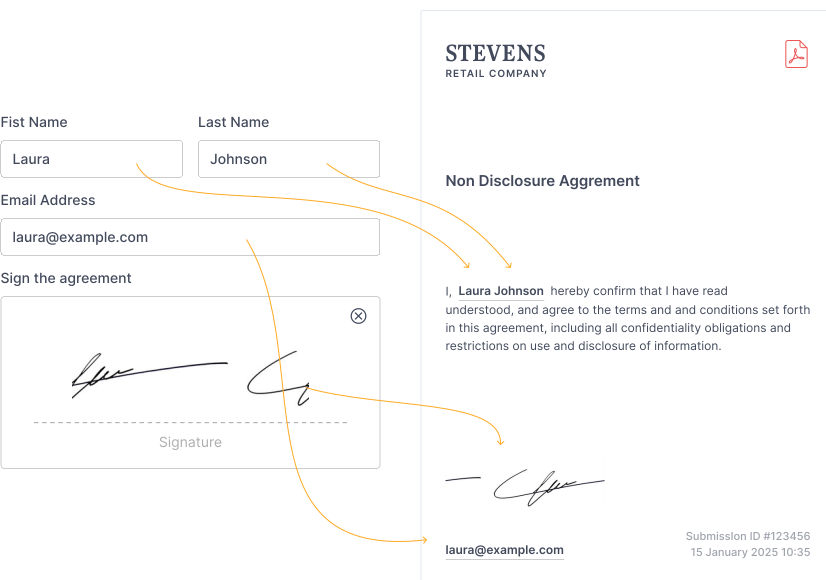
Convert Forms includes a PDF Generator feature that creates a PDF file from each form submission. This PDF is also regenerated automatically when you edit and save a submission in the backend. During this regeneration process, the {submission.date} Smart Tag did not apply the site's timezone correctly. The original submission used the correct timezone, but the regenerated PDF did not.
This is now fixed. The Smart Tag always respects the site's time zone, both when the user submits the form and when the PDF Generator creates a new version of the file on the backend. This keeps timestamps accurate and prevents mismatches between the original submission and later updates.
Insert new fields before the Submit button
This one earned a cheer inside the office. Previously, when you added a new field to a form, it always appeared at the very bottom. Since the Submit button is a regular field, many users ended up with new fields inserted after the button and had to drag things around manually.
From now on, if your form already contains a Submit button, any new field is automatically placed right before it. We assume your form includes a Submit button, unless you prefer to collect submissions via telepathy. If there is no Submit button yet, the behavior remains the same as before.
Google Structured Data
Our SEO extension gets improvements that help your schema stay clean and compliant with Google standards.
Merging multiple FAQ groups into a single FAQPage
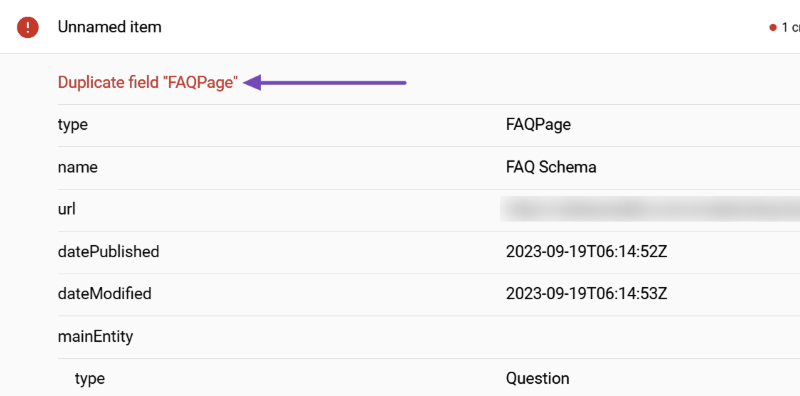
Our extension helps you add a clean and valid FAQ schema to your site. Some users place multiple FAQ groups on the same Joomla page. Previously, we generated a separate JSON-LD script for each group, which caused Google's Rich Results Test Tool to complain about the Duplicate field FAQPage error.
We fixed this by merging all FAQ groups into a single FAQPage entity. Every question and answer now lives in one tidy JSON-LD script, exactly the way Google prefers. This helps avoid warnings and keeps your schema output easier to manage.
TechArticle subtype in Article Schema
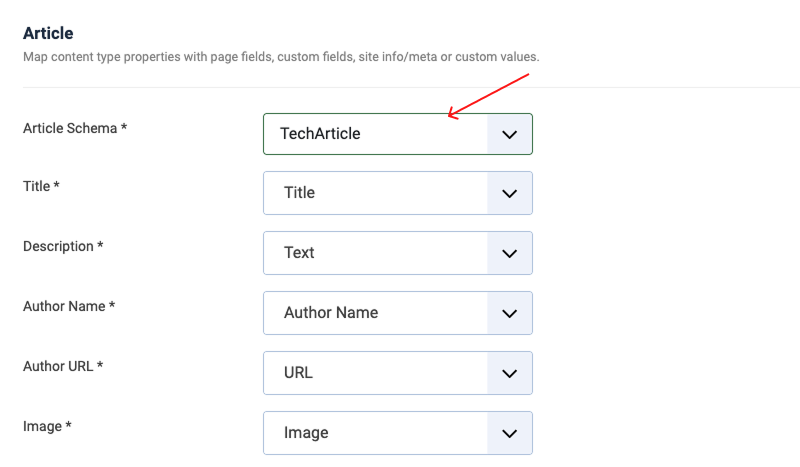
The Article Schema supports several article subtypes, such as BlogPosting and NewsArticle. Many of you publish technical tutorials or guides, so we added support for TechArticle as well.
This subtype helps search engines better understand that your content is technical or instructional. It is a small addition that improves the clarity of your structured data and gives you more accurate markup for different article styles.
Price ranges in Service Schema

The Service Schema previously allowed only a single price. That worked fine for flat fee services, but many businesses charge within a range. With this update, you can now enter price ranges, for example, 15 to 55 EUR, and our extension will include them correctly in your structured data.
This gives more realistic information to search engines and users who rely on rich results. It is especially useful for services with variable pricing, such as repairs, consulting, or work where the final cost depends on the scope.
EngageBox
Our popup extension continues to focus on stability and smoother behavior across devices.
Custom close buttons with redirection now write cookies on mobile
On mobile browsers, custom close buttons created with <a> tags and data-ebox-cmd="close" did not write the cookie that prevents the popup from reappearing. The browser left the page too quickly because it navigated to the link before the cookie write request was finished.
We now stop the default navigation, write the cookie first, then handle the redirection with JavaScript. This respects the target attribute, and it ensures the popup stays closed as expected.
Renamed trigger labels for clarity
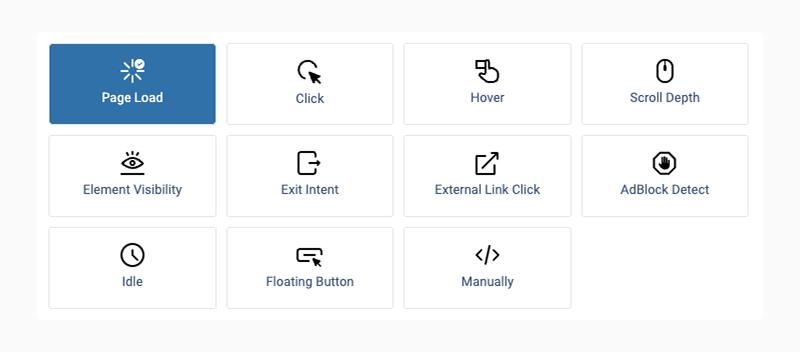
We simplified the trigger names in the backend. For example:
- "On Page Load" is now "Page Load"
- "On Exit Intent" is now "Exit Intent"
- "On Idle" is now "Idle"
Shorter labels make the UI more approachable, especially for users new to Joomla popups.
Also available for WordPress

If you are working with WordPress instead of Joomla, EngageBox also lives there under a different name. FireBox is our popup builder for WordPress, built on the same ideas and experience we gained from years of developing popup extensions for Joomla. It focuses on clean triggers, flexible display rules, and a familiar workflow for EngageBox users.
Advanced Custom Fields
Advanced Custom Fields for Joomla continues to focus on stability, editor compatibility, and better behavior inside complex Joomla layouts. This cycle includes fixes and improvements across several custom fields, especially in nested subforms and media handling.
Gallery Field: Media Manager paths and nested subforms support
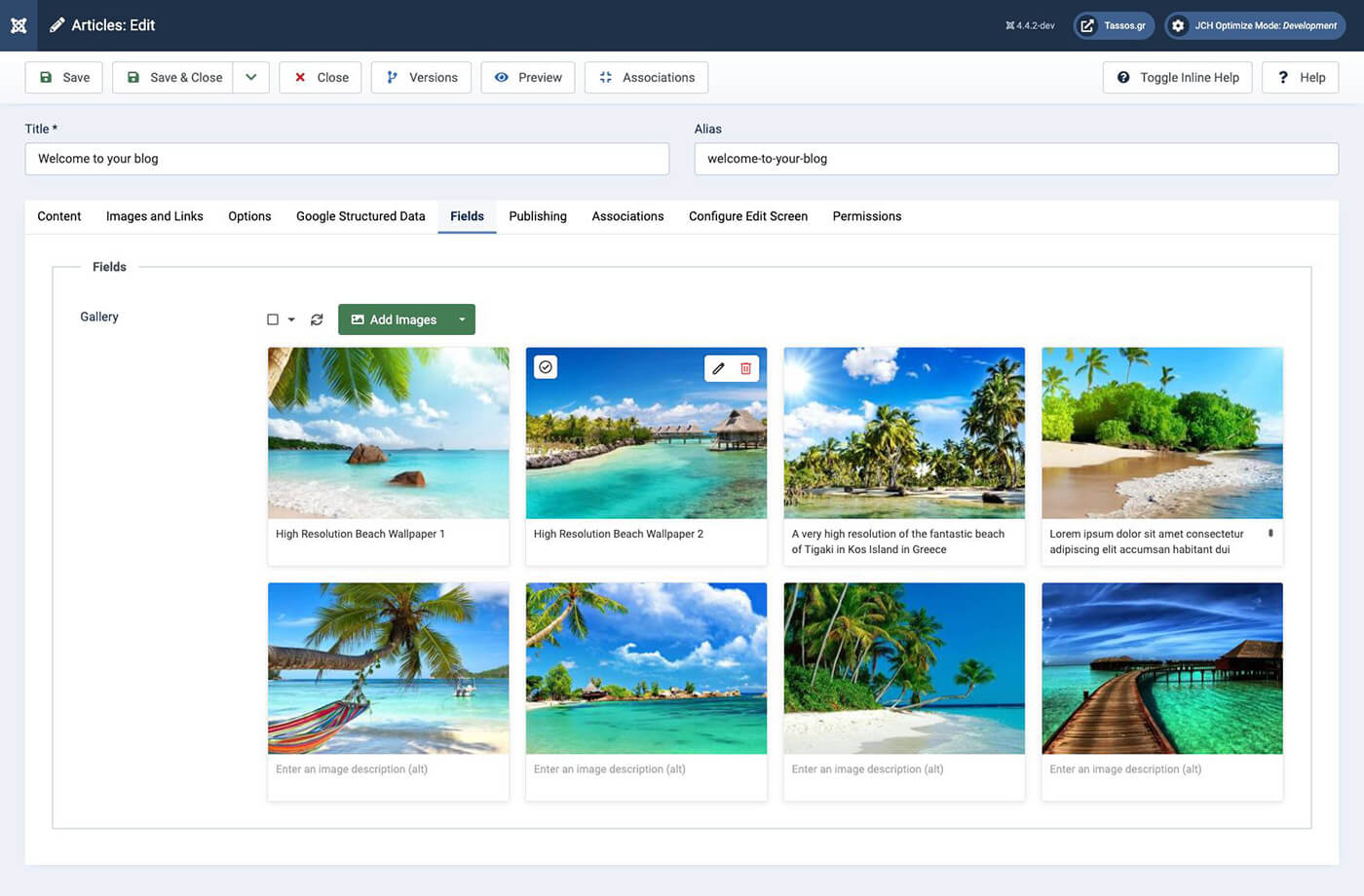
The Gallery Custom Field lets you upload images directly from your computer, and it also lets you select existing images from the Joomla Media Manager. Some sites use a custom media path instead of the default /images folder. When that option was changed in the Media Manager configuration, selected images could fail to upload through the Gallery field.
This has now been fixed. The Gallery field correctly respects custom Media Manager paths, so selecting existing images works as expected, no matter how your Joomla media folders are configured.
We also fixed an issue where the Gallery field did not work correctly inside Joomla nested subform fields. You can now safely use gallery fields inside complex repeatable structures without broken uploads or missing values.
Video Field: Better previews and broader video support
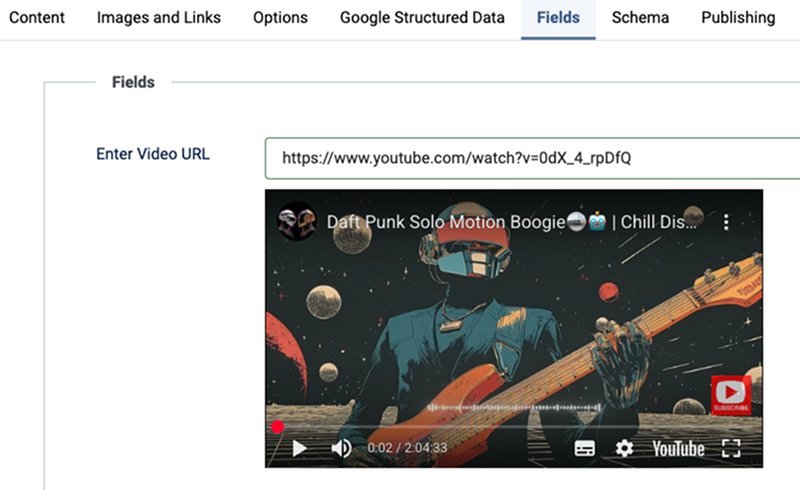
The Video Custom Field allows editors to embed videos from popular platforms directly into Joomla content. In this cycle, we focused on improving compatibility and preview behavior.
We added full-screen support for Vimeo videos, so editors and visitors can now switch to full-screen mode when viewing Vimeo embeds.
Support for YouTube live video URLs has also been fixed. Previously, live video links failed to render both in the backend preview and on the frontend. The embed now works correctly in both places.
We also fixed a broken preview issue with Facebook video URLs. When adding a Facebook video, the preview below the field now loads as expected in the backend.
FAQ Field: Cleaner schema and editor compatibility
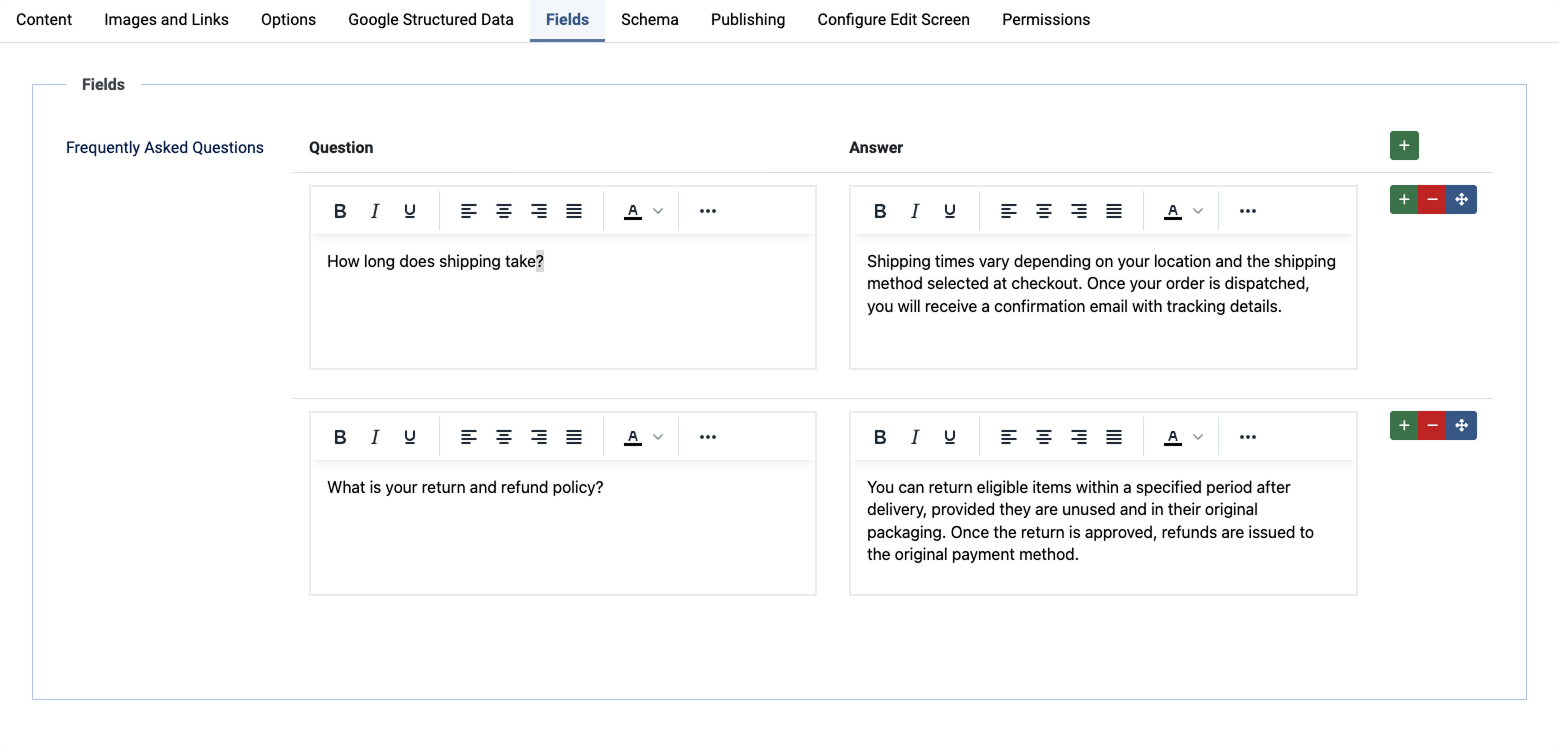
The FAQ Custom Field lets you build structured FAQ content inside Joomla articles and categories. Similar to the fix we introduced in Google Structured Data, we resolved the Duplicate field FAQPage error reported by Google's Rich Results Test Tool. Multiple FAQ groups on the same page are now merged correctly into a single FAQPage entity.
We also fixed an editor issue when working inside Joomla categories with JCE set as the default editor. In some cases, the Question and Answer editors appeared broken or failed to load. This is now resolved, and the editors load correctly across all supported configurations.
Address Autocomplete: Clear feedback and smoother editing
The Address Autocomplete Custom Field helps users select addresses using an interactive map. To improve the user experience, we added a loading spinner that appears while the address search is in progress. This gives clear feedback and avoids the feeling that the field is stuck.
We also fixed an issue where the editor could become unresponsive, preventing the map marker from being moved or cleared.
Another fix addresses a case where articles could not be saved if the interactive map was disabled while the field was required. Saving now works correctly in all configurations.
File Upload Field: Nested subform support
The File Upload field had the same limitation as the Gallery field when used inside Joomla nested subform fields. Uploads could fail or behave inconsistently in repeatable layouts.
This has now been fixed. File Upload fields work correctly inside nested subforms, allowing you to build more advanced Joomla content structures without workarounds.
Smile Pack
Smile Pack includes everyday Joomla modules that help you add common features to your site without extra setup. In this cycle, we focused on fixing a few issues that were already addressed in other extensions, bringing the same stability and behavior improvements to Smile Pack as well.
Accordion Module: FAQ Schema without duplicate errors
The Accordion Module helps you present content in vertically collapsing panels, which is perfect for FAQs, feature lists, or step-by-step explanations in Joomla. It also includes an option to generate FAQ Schema when you use it to display questions and answers.
This is now fixed. When multiple accordion instances generate FAQ data on the same page, they are merged into a single FAQPage entity. This keeps your structured data clean and prevents Google warnings.
Map Module: Stable editor behavior
The Map Module lets you embed interactive maps in Joomla modules using Google Maps or OpenStreetMap. It is commonly used to show business locations, offices, accommodations, or any point of interest directly on a Joomla page.
In some cases, the map editor could become unresponsive, preventing markers from being moved or the map from being adjusted. This made it difficult to fine-tune the embedded map, especially when working with multiple locations.
We fixed this issue using the same approach applied to the ACF Address Autocomplete field. The editor now behaves reliably, allowing you to edit and embed maps without interruptions or page refreshes.
Gallery Module: Media Manager file handling
The Gallery Module helps you create photo galleries in Joomla using images from the Joomla Media Manager or direct uploads. It is commonly used for portfolios, image collections, and visual sections where photos play a central role.
On sites where the Media Manager is configured with a custom folder instead of the default /images path, selected files could fail to move to their destination folder. This resulted in missing images and galleries that did not render correctly.
We fixed this using the same solution applied in Advanced Custom Fields. Images selected from the Media Manager are now handled correctly, regardless of how your Joomla media paths are configured, making it easier to create photo galleries without extra steps.
Featured Articles



 Rated: