
May - Jun 2026 Product Updates

May and June kept us busy. Convert Forms got the lion's share of the work, headlined by a feature that quietly records the story behind every submission. Google Structured Data, Smile Pack, and Advanced Custom Fields all picked up meaningful improvements, too.
If you missed the last two rounds, catch up on the Mar - Apr 2026 Product Updates and the Jan - Feb 2026 Product Updates.
Let's get into it.
Convert Forms
Our contact form builder, saw the busiest cycle of all. Most of the work went into submissions: what you capture, how you view it, and how you get it out. Here are the highlights.
Introducing Submission Context Tracking
Say you wanted to know the visitor's IP, the country they submitted from, or the exact page a form lived on. Until now, that was a manual project. You'd add a hidden field for each value, wire each one to a Smart Tag, and so on, then repeat the entire setup on every form you run. With a dozen forms, that's the same busywork a dozen times over. And if you forgot a field on one form, that data was gone for good, with no way to recover it.
Introducing Submission Context Tracking. Convert Forms now records all of it automatically, the same way on every form. No fields to add, nothing to maintain. On top of the basics, you get details you'd almost never wire up by hand: the country, device type, operating system, browser, referrer, and UTM parameters, all captured on every submission.
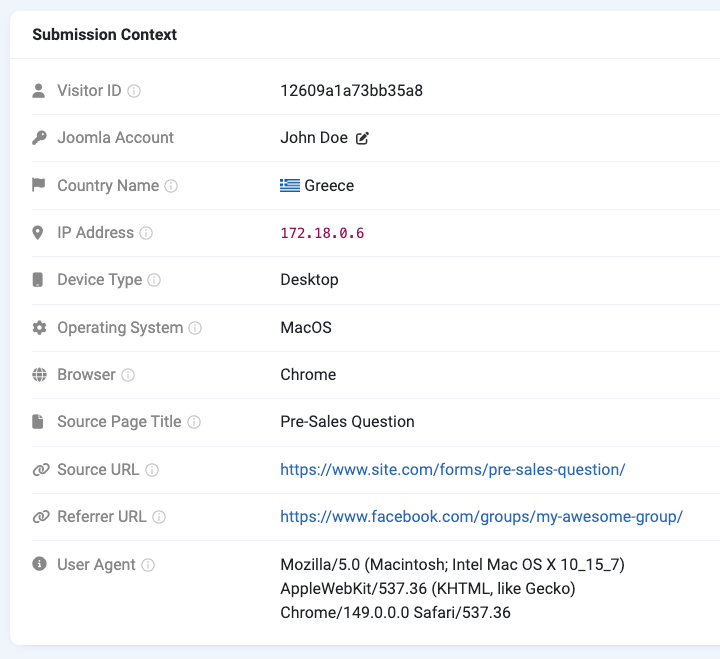
Three pieces make this work:
- New Submission Context Smart Tags so you can drop any of these values into emails and notifications.
- A Store IP Addresses privacy option in the extension configuration lets you turn off IP recording when your privacy policy calls for it.
- A redesigned Submission Edit page with a dedicated Submission Context card that lays all of this out at a glance.
Choose exactly what lands in your export
The Submissions export used to be all-or-nothing on the field side. If you only needed three columns in your spreadsheet, you still got everything the form collected, then cleaned it up by hand afterward.
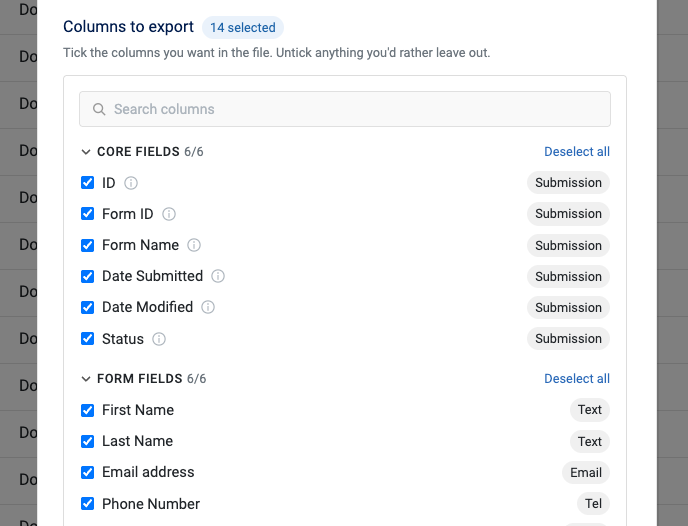
The export pop-up now includes a Properties to Export picker. Tick the form fields you want, skip the ones you don't, and pull in the new context properties (IP, country, device, referrer, and the rest) if you need them. Your selection is remembered per form, so the next export starts where you left off.
Details are in the Exporting Submissions doc.
A Submissions table you can actually shape
A busy form can collect a dozen fields or more, and the Submissions list tries to show all of them. That meant a lot of sideways scrolling to find the two or three columns you actually cared about.
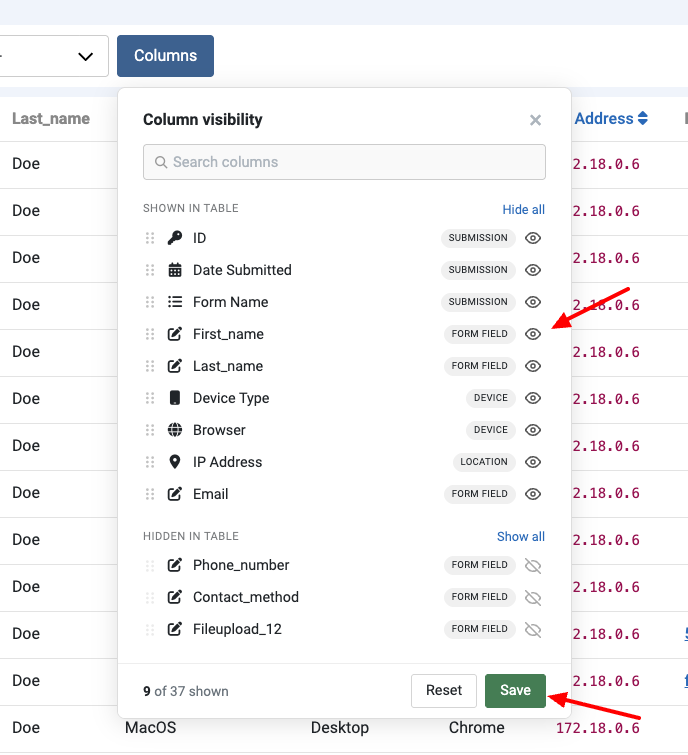
We rebuilt the columns picker from the ground up. Search to find a column fast, hide the ones you don't need, and drag the rest into whatever order makes sense for that form. The best part: your layout is saved against your own user account, per form. It sticks between logins, and it doesn't step on what your colleagues see.
More in Customize Columns.
Smart Tags get sharper
A few refinements landed for anyone building custom emails and notifications:
{all_fields}is now{submission.details}. The old tag still works, so nothing breaks in your existing templates.-
{submission.fields}picked up a--tmpl=tableoption that renders all fields in a clean tabular layout instead of the default list. Handy for admin notification emails. See the Smart Tags reference.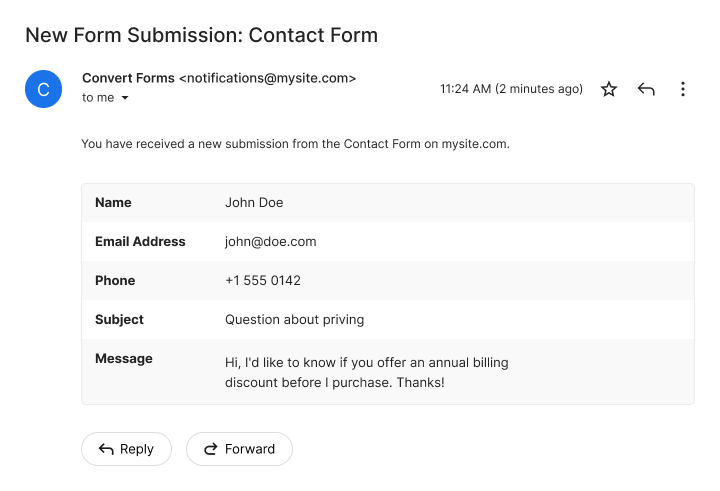
- A new
{submission.identify}aggregate tag outputs the submission's core metadata (its ID, the form it belongs to, its status, and its submission and modification dates) in a single block. More in the identity Smart Tags docs.
Brevo now supports double opt-in
If you sync form entries to Brevo, you probably want new contacts to confirm their email before joining your list. Standard practice for clean lists and GDPR peace of mind, and the Brevo Task couldn't do it.
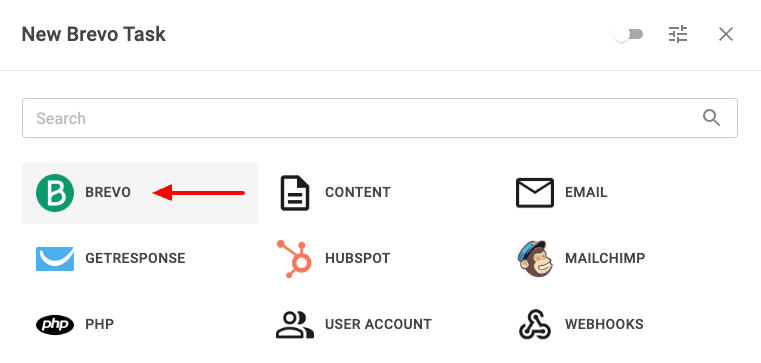
It can now. Flip on Double Opt-In in the Brevo task's Setup Action step, pick a confirmation template from your Brevo account, and optionally set a redirect URL. Brevo emails the subscriber, and the contact only joins your list after they click the link in the email.
Full control over browser autocomplete
Autocomplete on a field used to be a simple on/off switch. Fine most of the time, but not when you needed the browser to treat a field as something specific.
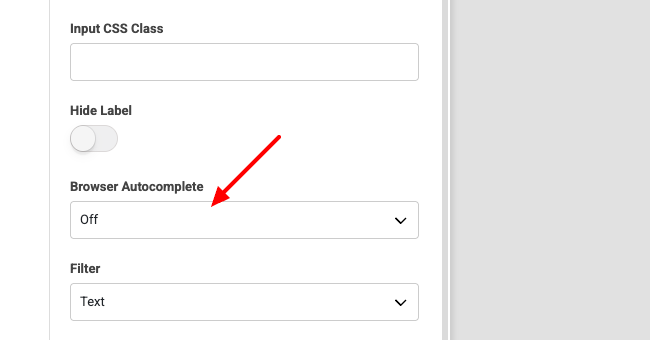
Input fields now have a Browser Autocomplete dropdown with three options.
- Default leaves it to the browser.
- Off stops suggestions entirely, which is exactly what you want on confirmation fields or one-time reference numbers.
- Custom lets you enter your own HTML autocomplete token, like
emailorgiven-name, to tell the browser precisely what the field is for.
Full breakdown in the Browser Autocomplete docs.
Fresh installs no longer include Campaigns
We flagged this a year ago: Campaigns is deprecated, and Tasks is its more flexible replacement. As of this cycle, Campaigns is entirely removed from fresh installations.
If you already use Campaigns, nothing changes for you. Existing installs continue to work, and the update mechanism handles the transition automatically when the section is eventually removed. Only brand-new installs start clean on Tasks.
The full picture, including the migration path, is here: Campaigns deprecated.
CAPTCHA plugins tidied up
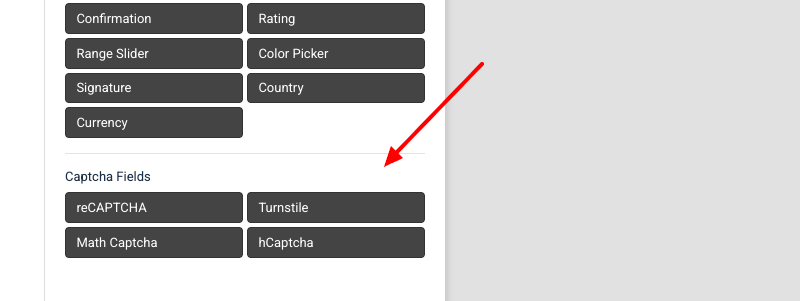
The standalone reCAPTCHA Checkbox and reCAPTCHA Invisible plugins were doing a job the generic reCAPTCHA form field already handles, so they were both deprecated. We removed them. You can still use either mode; just pick it directly from the reCAPTCHA field. While we were in there, we moved all CAPTCHA plugins into their own group in the form builder's field list, so they're easier to find.
Google Structured Data
Every improvement this cycle for our Joomla SEO extension centered on HTML-to-Markdown, the feature we shipped back in May.
Quick recap on what it does: when an AI agent or LLM crawls one of your Joomla pages, it normally has to wade through a full HTML document stuffed with menus, scripts, ads, and footers. HTML to Markdown hands it a clean version instead. Append .md to any page URL, or send an Accept: text/markdown header, and you get just the page's content as tidy Markdown, with the title, description, and structured data included. Agents get the signal without the noise.
We just published a full write-up on the thinking behind it: Same Joomla page, fewer tokens: serve Markdown to ChatGPT.
Here's what we improved.
More control over what goes into the Markdown
The default output includes a YAML frontmatter block and a schema summary, which is great for agents who want the full picture. Some sites, though, just want the raw page content and nothing else.
Two new levers cover both cases. A data-gsd-markdown-ignore HTML attribute lets you exclude specific elements from the Markdown output, so anything you mark gets stripped out. And new options let you toggle the YAML frontmatter and the schema summary on or off, for a leaner Markdown version when that's what you're after.
Keeping Markdown URLs out of search results
Left alone, search engines could index both the HTML and the Markdown version of the same page, which is textbook duplicate content.
Markdown responses now send a X-Robots-Tag: none header that is equivalent to noindex, nofollow, so crawlers skip the Markdown URL entirely and index only the canonical HTML page. The nofollow half also means crawlers don't chase links inside the Markdown response. Those links already exist on the canonical page, so there's nothing new to discover there anyway.
A round of fixes
We also cleaned up several rough edges in the Markdown pipeline:
- Markdown requests were sometimes served as cached HTML when JCH Optimize or another page-cache plugin was active. Fixed.
- Shortcodes were left unparsed in the Markdown output. Fixed.
- Cached Markdown responses weren't cleared after you changed the extraction method. Fixed.
- SEF URLs were returning 404 in some setups. Fixed.
Code Snippets
If you missed its launch a few months back, Code Snippets is our newest Joomla extension. It gives you one central place to write, organize, and run custom JavaScript, CSS, HTML, and PHP, without touching your template files or piling on a plugin for every little tweak. Handy for admins, developers, and agencies who want their customizations in one spot and safe from updates.
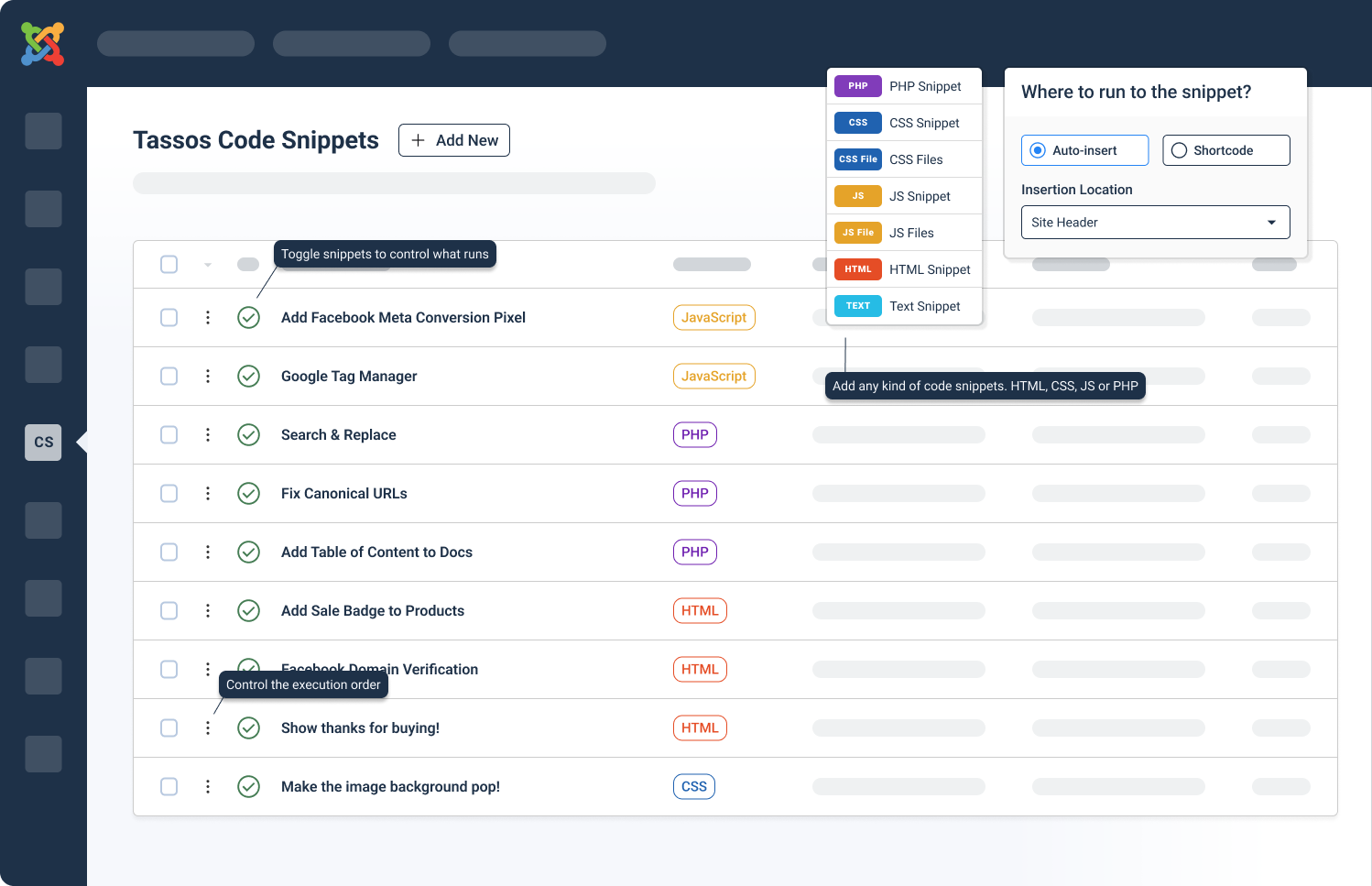
This cycle brought two small quality-of-life additions for snippet management. Both save you a couple of clicks on things you do often.
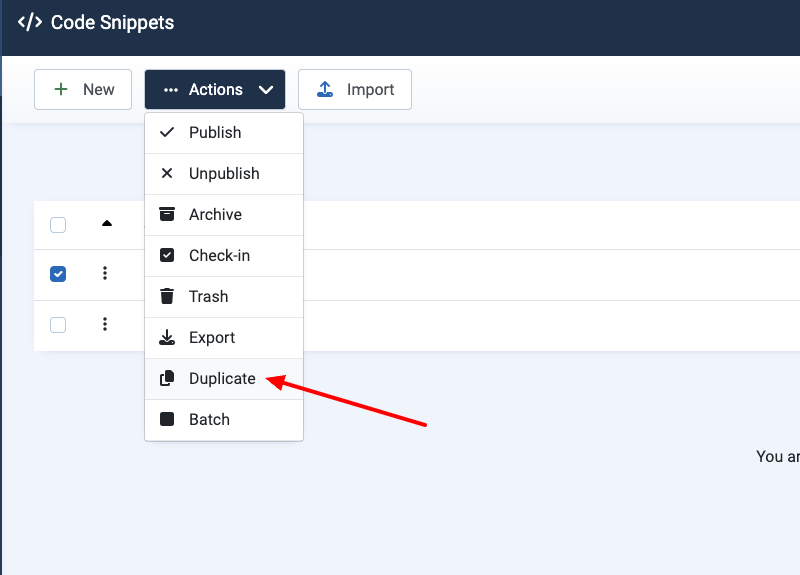
One-click snippet duplication
Duplicating a snippet meant reaching for the Batch Process action button, which is more detour than shortcut for a single copy. There's now a direct Duplicate button in the snippet's dropdown menu, so you can clone a snippet in one click.
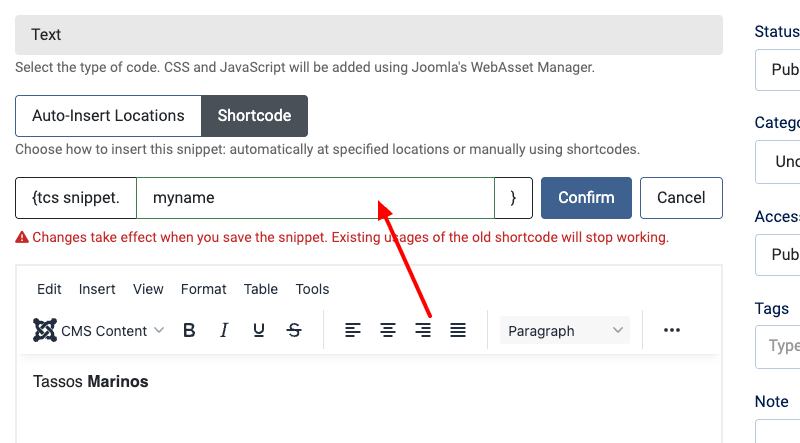
Rename a snippet's shortcode from the edit screen
You can now set a snippet's shortcode to a name of your choosing, right from the edit screen. Give it a shortcode that actually reads like what it does.
Advanced Custom Fields
A batch of fixes and a few additions across several field types. Let's run through them by field.
File Upload field
Three issues cleared up in the File Upload field:
- Deleting a File Upload field from inside a Subform wasn't removing the physical file from the server. It now deletes properly.
- The "Randomize File Names" setting was being ignored. It's honored again.
- When an uploaded file couldn't be moved to a non-writable or invalid upload folder, the field failed silently. It now shows a clear error instead, so you know exactly what went wrong.
Video field
Two improvements for the Video field:
- You can now read a Video field's start and end times straight from the video URL, overriding the global settings. Works for YouTube, Vimeo, and Dailymotion.
- The "Related Videos" option got a clearer description. It can show related videos from any channel or restrict them to the current channel.
Gallery field
Fixed the Gallery field failing to upload images when the site's temporary folder sits outside the web root.
Map field
The Map field now supports importing and exporting marker titles and descriptions, so your markers survive a round trip through import/export intact.
Security Fixes
Two security fixes shipped this cycle, both in Convert Forms 5.2.0. One is in Convert Forms itself. The other comes through the bundled Tassos Framework. If you run Convert Forms, update now.
Submissions exports could reach the wrong files
When you export your submissions, Convert Forms writes the file to a temporary folder and then hands it to your browser. It trusted the request about which file to hand over. It didn't check whether that file actually belonged to the export folder.
A crafted request could point at any file the server could read, and get it back. The export is deleted once it's been sent, so the same request could delete that file too. It took an administrator account to pull off. The server also didn't check that the request came from the Convert Forms admin screen. Your browser attaches your login automatically, so an admin who visited the wrong page could fire the request without realizing it.
The fix keeps every temporary file Convert Forms creates in one dedicated folder. Any request pointing outside that folder is rejected. Exports now also confirm the request came from the admin screen before anything is sent. Exporting submissions works exactly as it did before.
Old vulnerable files left behind on update
When we drop a file from an extension, Joomla's updater doesn't remove it from your site. It overwrites what's in the new package and leaves everything else alone. A retired file just sits there.
That's what happened to the old inline file upload field. We pulled it as part of the Tassos Framework patch released in February. Removing it from the package stopped us shipping it, but it didn't delete it from sites that already had it. The vulnerable code stayed on the server, and it was still reachable. That's why we're marking this as a security fix rather than housekeeping.
The Tassos Framework now cleans up after itself. On update it deletes the files it has retired. The cleanup only runs on sites that haven't had it yet, and running it twice is harmless. Nothing to do on your end beyond updating your extensions.
Featured Articles



 Rated: