

-
- Managing Form Submissions
- Searching and Filtering Submissions
- Submission Context Tracking
- Customizing Submission Columns
- Editing Submissions
- Deleting Submissions
- Importing Submissions
- Exporting Submissions
- Exporting Submissions with a Webhook URL
- Tracking the User's IP Address
- Tracking the User's Country
- Disable Submission Storage
- Auto-Delete Old Submissions
- Auto-Save Each Submission to a JSON file
- Increment a Count on Each Submission
- Add a Unique ID to Each Submission
-
- Email the Person Who Filled Out the Form
- Send an Email Only When a Checkbox Is Checked
- Attach the Submission PDF to Emails
- Send Email Based on Drop Down Selection
- Send Different Email Content Based on Form Responses
- Set up Auto-Responder Emails
- Styling Emails with CSS
- Sending Plain-Text Alternative Body Emails
- Troubleshooting Email Delivery
- Tracking Sent Emails
- Resending Emails
-
- Browser Autocomplete for Form Fields
- Redirect to a Menu Item After Form Submission
- Show a Form Only to Logged-In Users
- Adding an “Other” Option
- Show or Hide Form Fields Based on User Joomla User Group
- Scroll the Page to the Top When a Long Form is Submitted
- Display Submissions Count for a Specific Form
- Populate Drop Down, Radio Buttons or Checkboxes with a CSV File
- Silently POST Submitted Data to Any API or URL
- Create a Custom Login Form
- Auto-Populate Fields with Article Data
- Add a placeholder text to a Dropdown field
- Create Multilingual Forms in Joomla
- Redirect User to a URL After Form Submission
- Importing and Exporting Forms
- Display Convert Forms in a popup
-
- Does Convert Forms Use Cookies?
- Minimum Time to Submit
- Restrict Form Submissions Based on IP
- Enforcing a Custom Password Policy in Convert Forms
- Add ALTCHA Proof of Work to your Joomla form
- Add Cloudflare Turnstile to your Joomla Form
- Implement the Iubenda Consent Database in Joomla with Convert Forms
- Add Custom Validations to Fields and Forms
- Add Math Captcha to your Form
- Prevent a Field From Saving in the Database
- Add hCaptcha to your Form
- Enable Double Opt-in
- Allow Form Submissions in Specific Date Range
- Ensure a Unique Value is Entered Into a Field
- Block Form Submissions Containing Profanity (Bad Words)
- Block Email Addresses or Email Domains
- Honeypot
- Setting Up Google reCAPTCHA
- Create GDPR Compliant Forms
Browser Autocomplete for Form Fields
Each input field in Convert Forms has a Browser Autocomplete setting. You can leave it to the browser, turn off suggestions, or point it to a specific token like email or given-name.
Browsers often prioritize user settings over HTML attributes. The autocomplete attribute is a hint, not a guarantee. Support varies across browsers (see the MDN compatibility chart).
Set Autocomplete for a Specific Field
Use this when you want different autocomplete behavior on individual fields. Each field can have its own setting, independent of the others.
- Log in to your Joomla administrator
- Go to Components → Convert Forms
- Edit your form.
- Click the field you want to configure.
-
In the field settings panel, find Browser Autocomplete.
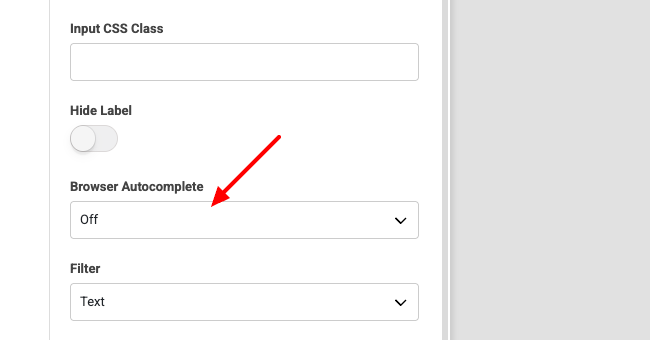
- Choose one of the following options and save.
- Default: No
autocompleteattribute is added. The browser decides whether to suggest values based on the field type and the user's own settings. - Off: Sets
autocomplete="off"on the input. The browser won't offer suggestions for this field. Good for fields where autofill would be confusing, like a "confirm email" or a dynamically generated reference number. - Custom: Enter any valid HTML autocomplete token to tell the browser exactly what the field expects.
- Default: No
Disable Autocomplete for All Fields in a Form
To turn off autocomplete for an entire form, add autocomplete="off" to the <form> element via a PHP snippet.
- Log in to your Joomla administrator
- Go to Components → Convert Forms
- Edit your form.
- Go to Behavior → PHP Scripts → Form Display.
- Paste this snippet:
$needle = '<form name="cf'.$form['id'].'"';
$replacement = $needle . ' autocomplete="off"';
$formLayout = str_replace($needle, $replacement, $formLayout);
Notes
- Chrome and Safari often ignore
autocomplete="off"for login fields and show saved credentials anyway. - For password and other sensitive fields,
new-passwordis more reliably respected thanoff. - Field-level autocomplete takes priority over any form-level setting.
Last updated on May 26th 2026 11:05

Tassos offers a premium suite of Joomla extensions with 7 products and over 2.4 million downloads, providing reliable solutions since 2014.


 Rated:
Copyright © 2014 - 2026 - Smile Motive Development LP. All Rights Reserved.