

-
- Managing Form Submissions
- Searching and Filtering Submissions
- Submission Context Tracking
- Customizing Submission Columns
- Editing Submissions
- Deleting Submissions
- Importing Submissions
- Exporting Submissions
- Exporting Submissions with a Webhook URL
- Tracking the User's IP Address
- Tracking the User's Country
- Disable Submission Storage
- Auto-Delete Old Submissions
- Auto-Save Each Submission to a JSON file
- Increment a Count on Each Submission
- Add a Unique ID to Each Submission
-
- Email the Person Who Filled Out the Form
- Send an Email Only When a Checkbox Is Checked
- Attach the Submission PDF to Emails
- Send Email Based on Drop Down Selection
- Send Different Email Content Based on Form Responses
- Set up Auto-Responder Emails
- Styling Emails with CSS
- Sending Plain-Text Alternative Body Emails
- Troubleshooting Email Delivery
- Tracking Sent Emails
- Resending Emails
-
- Browser Autocomplete for Form Fields
- Redirect to a Menu Item After Form Submission
- Show a Form Only to Logged-In Users
- Adding an “Other” Option
- Show or Hide Form Fields Based on User Joomla User Group
- Scroll the Page to the Top When a Long Form is Submitted
- Display Submissions Count for a Specific Form
- Populate Drop Down, Radio Buttons or Checkboxes with a CSV File
- Silently POST Submitted Data to Any API or URL
- Create a Custom Login Form
- Auto-Populate Fields with Article Data
- Add a placeholder text to a Dropdown field
- Create Multilingual Forms in Joomla
- Redirect User to a URL After Form Submission
- Importing and Exporting Forms
- Display Convert Forms in a popup
-
- Does Convert Forms Use Cookies?
- Minimum Time to Submit
- Restrict Form Submissions Based on IP
- Enforcing a Custom Password Policy in Convert Forms
- Add ALTCHA Proof of Work to your Joomla form
- Add Cloudflare Turnstile to your Joomla Form
- Implement the Iubenda Consent Database in Joomla with Convert Forms
- Add Custom Validations to Fields and Forms
- Add Math Captcha to your Form
- Prevent a Field From Saving in the Database
- Add hCaptcha to your Form
- Enable Double Opt-in
- Allow Form Submissions in Specific Date Range
- Ensure a Unique Value is Entered Into a Field
- Block Form Submissions Containing Profanity (Bad Words)
- Block Email Addresses or Email Domains
- Honeypot
- Setting Up Google reCAPTCHA
- Create GDPR Compliant Forms
Add ALTCHA Proof of Work to your Joomla form
ALTCHA is a privacy-friendly, self-hosted Proof of Work CAPTCHA that blocks spam bots without asking your visitors to click checkboxes or pick out traffic lights.
Rather than handing a puzzle to the person, ALTCHA hands the visitor's browser a small maths problem to work on quietly in the background. This is called a Proof of Work, or POW for short. A real visitor never notices it, but a bot firing off thousands of submissions pays the cost every single time, until spamming your form stops being worth the effort.
Everything happens between the browser and your own site: no API keys, no account, no third-party service, and no visitor data leaving your server. That also makes it the easiest captcha to set up in Convert Forms. Drop the field on your form, and you're done.
Add ALTCHA to your form
-
Go to Components → Convert Forms → Forms
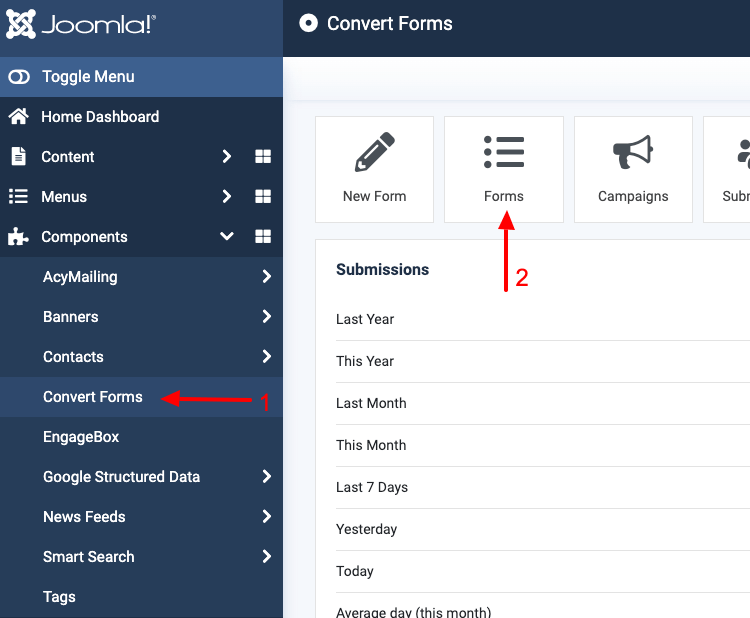
-
Open the form you want to protect.
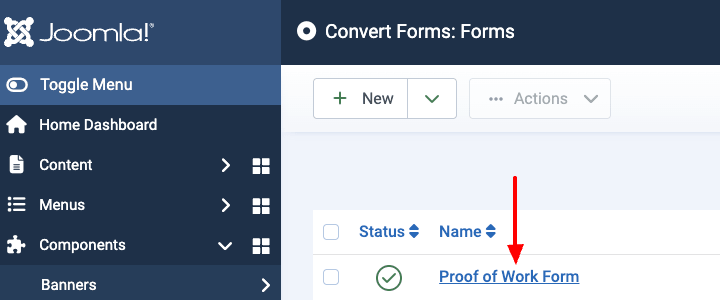
-
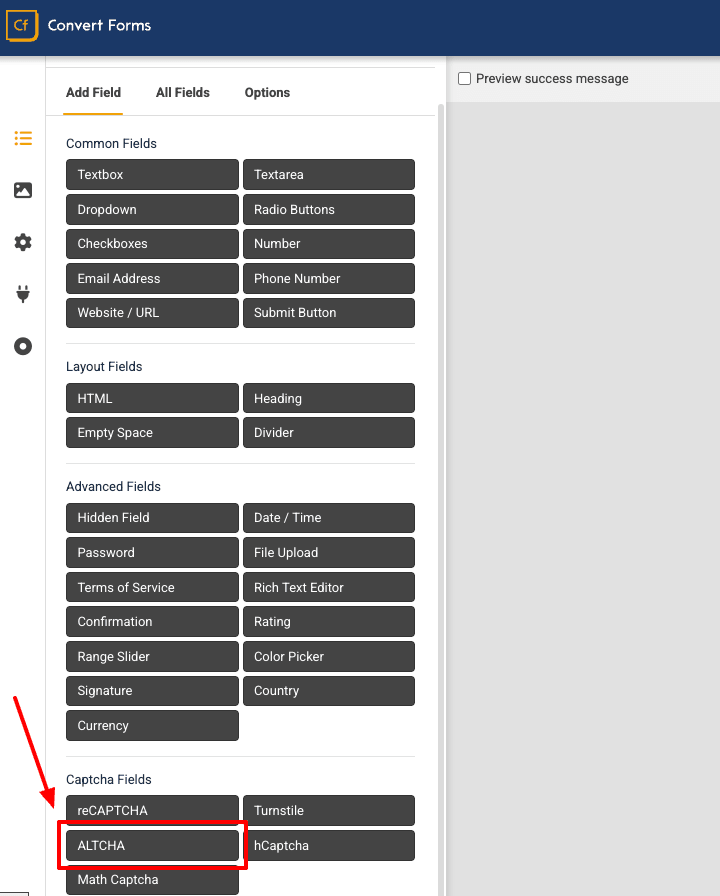
Choose the "Add Field" tab and click on the ALTCHA field in the Captcha Fields category.
The form now includes the ALTCHA (Proof of Work) captcha field.
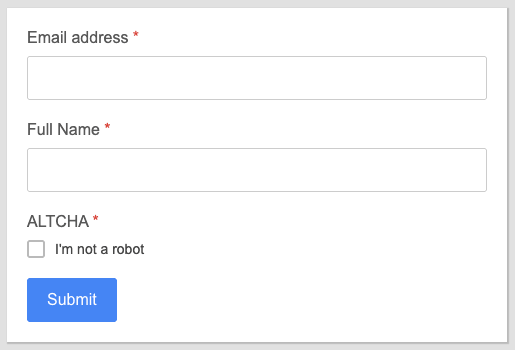
Finally, save the form. Your form now includes the ALTCHA (Proof of work) captcha field.
What your visitors see
The widget sits in your form showing an "I'm not a robot" line with a spinner, and it starts solving the moment the page loads. By the time most people have finished typing their message, it's already verified. No clicking, no puzzles.
Translate the widget's text
To translate the ALTCHA widget's text, go to System → Manage → Language Overrides, select Site and your language, and create an override for each constant below.
Searching for the text won't find these constants, so type them in yourself.
| Constant | Default text |
|---|---|
| COM_CONVERTFORMS_FIELD_ALTCHA_VERIFY_LABEL | I'm not a robot |
| COM_CONVERTFORMS_FIELD_ALTCHA_VERIFYING | Verifying... |
| COM_CONVERTFORMS_FIELD_ALTCHA_VERIFIED | Verified |
| COM_CONVERTFORMS_FIELD_ALTCHA_VERIFICATION_REQUIRED | Verification required! |
| COM_CONVERTFORMS_FIELD_ALTCHA_WAIT_ALERT | Verifying... please wait. |
| COM_CONVERTFORMS_FIELD_ALTCHA_EXPIRED | Verification expired. Try again. |
| COM_CONVERTFORMS_FIELD_ALTCHA_ERROR | Verification failed. Try again later. |
| COM_CONVERTFORMS_FIELD_ALTCHA_FAILED | The CAPTCHA verification failed. Please try again. |
Do you need Joomla's Proof of Work captcha plugin?
No. Joomla 6.1 ships its own Proof of Work captcha plugin, also built on ALTCHA, and you might already have it enabled for your site's login or registration forms.
Convert Forms doesn't use it. Our ALTCHA field is self-contained: it bundles its own widget, serves its own challenges, and verifies them itself. You don't have to enable Joomla's plugin, set it as your default captcha, or run Joomla 6.1 at all.
ALTCHA or one of the other captchas?
ALTCHA is the right default for most forms, especially if you'd rather not hand visitor data to Google or Cloudflare, or you just don't want to manage API keys.
Reach for one of the others when you need what they offer:
- and score visitor behaviour and can challenge suspicious ones.
- is a good pick if your site already sits behind Cloudflare.
- asks the human to do the work, which some sites prefer.
You might not need a captcha at all
Convert Forms adds to every form automatically. It's a hidden field that bots fill in, and humans never see, and it catches a lot of spam on its own.
If you're still getting through, stack ALTCHA on top of it and pair it with for good measure.



 Rated: