

-
- DJ-Catalog2
- DJ-Classifieds
- DJ-Events
- DPCalendar
- EasyBlog
- Eshop
- Event Booking
- Gridbox
- HikaShop
- iCagenda
- J2Commerce
- JBusiness Directory
- JCal Pro
- JEvents
- Joomla Articles
- Joomla Menu Manager
- JoomShopping
- JReviews
- K2
- OSCampus Structured Data
- Quix Page Builder
- RSBlog
- RSEventsPro
- SEO Glossary
- SobiPro
- SP Page Builder
- VirtueMart
- YOOtheme
- ZOO
-
- Troubleshoot Structured Data not Added to the Page
- Troubleshoot Structured Data not Identified by the Google Rich Results Tool
- Troubleshoot Structured Data not Showing in Search Results
- Preview button not showing on Structured Data Testing Tool
- I am seeing the "is not a known valid target type for the identifier property" error
- Fixing Error decoding JSON data in Joomla Articles
- Fix missing Google Structured Data tab in the Article Editing Page
-
- How to map schema properties using CSS Selectors
- How to Export and Import Google Structured Data Items
- HTML to Markdown Conversion
- Adding Facebook Open Graph Meta Data
- Site Representation Settings
- Use Structured Data for Google Merchant
- Create Multilingual Structured Data Items
- Use the Custom Code Content Type
- Prepare Content option
- Using the Schema Cleaner
Using the Schema Cleaner
When Google's Rich Results Test or the Schema Markup Validator reports errors or duplicate structured data, it's usually because Joomla, your template, or a third-party extension outputs its own incomplete or conflicting markup alongside the one Google Structured Data generates.
The Schema Cleaner removes that unwanted markup for you. It strips both microdata and JSON-LD, from the page's <body> and <head>, so Google sees only the clean schema Google Structured Data outputs.
How to Remove Duplicate or Faulty Structured Data
- Log into your Joomla backend.
- Go to Components → Google Structured Data → Configuration.
-
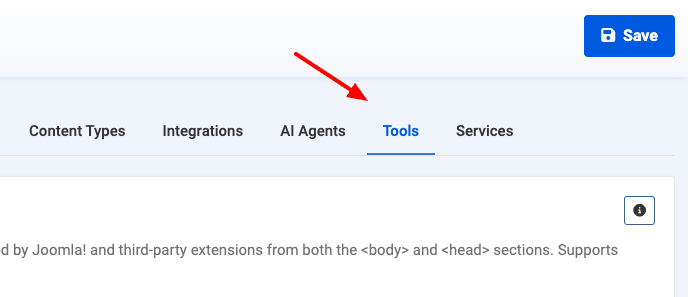
Open the Tools tab.
-
In the Schema Cleaner section, add a row for each schema type you want removed.
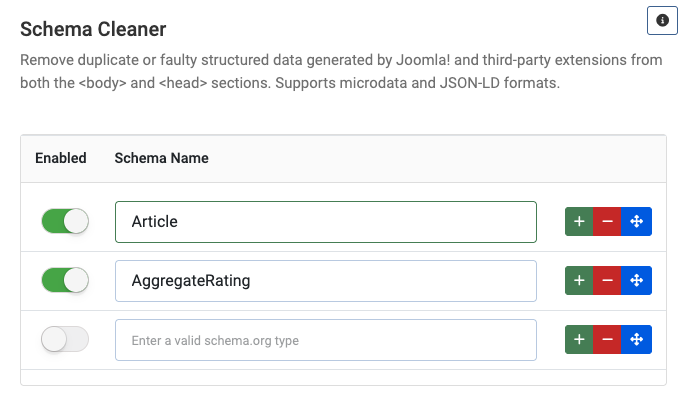
- In Schema Name, enter a valid schema.org type (for example
Article,BlogPosting,Breadcrumblist,AggregateRating, orProduct). - Enable the row and save.
To find the type to remove, run your page through the Rich Results Test and look at the schema type named in the error or duplicate. Enter that exact type as the Schema Name.
Last updated on Jul 2nd 2026 11:07
Schema and Structured Data Extension for Joomla
Markup your content with structured data and enhance the appearance of your website with rich results. Boost Joomla SEO in a few clicks.

Tassos offers a premium suite of Joomla extensions with 7 products and over 2.4 million downloads, providing reliable solutions since 2014.


 Rated:
Copyright © 2014 - 2026 - Smile Motive Development LP. All Rights Reserved.