

Unlock this and dozens of other powerful features by upgrading to Google Structured Data Pro.
Unlock this feature
-
- DJ-Catalog2
- DJ-Classifieds
- DJ-Events
- DPCalendar
- EasyBlog
- Eshop
- Event Booking
- Gridbox
- HikaShop
- iCagenda
- J2Commerce
- JBusiness Directory
- JCal Pro
- JEvents
- Joomla Articles
- Joomla Menu Manager
- JoomShopping
- JReviews
- K2
- OSCampus Structured Data
- Quix Page Builder
- RSBlog
- RSEventsPro
- SEO Glossary
- SobiPro
- SP Page Builder
- VirtueMart
- YOOtheme
- ZOO
-
- Troubleshoot Structured Data not Added to the Page
- Troubleshoot Structured Data not Identified by the Google Rich Results Tool
- Troubleshoot Structured Data not Showing in Search Results
- Preview button not showing on Structured Data Testing Tool
- I am seeing the "is not a known valid target type for the identifier property" error
- Fixing Error decoding JSON data in Joomla Articles
- Fix missing Google Structured Data tab in the Article Editing Page
-
- How to map schema properties using CSS Selectors
- How to Export and Import Google Structured Data Items
- HTML to Markdown Conversion
- Adding Facebook Open Graph Meta Data
- Site Representation Settings
- Use Structured Data for Google Merchant
- Create Multilingual Structured Data Items
- Use the Custom Code Content Type
- Prepare Content option
- Using the Schema Cleaner
Eshop Structured Data
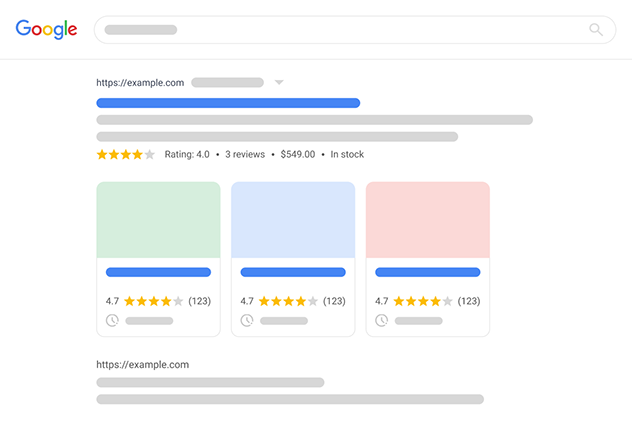
Add Product Structured Data to all Eshop products. Display pricing, availability, and reviews in search results. Help customers find your Joomla store items more easily.
Eshop Structured Data is available in Pro
Google Structured Data integrates perfectly with the Eshop component and enables you to add structured data and specifically the Product Content Type to your Eshop pages.
Enable Integration
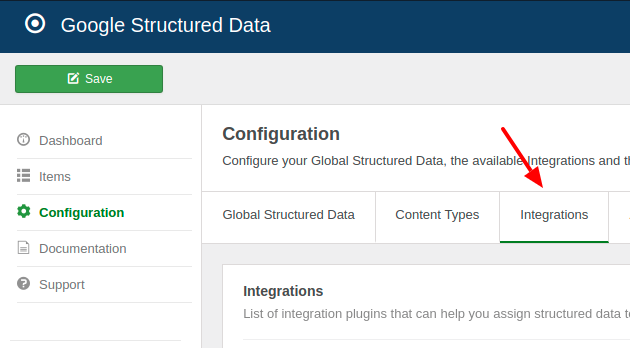
As with all of the integrations, go to Components → Google Structured Data → Configuration and open the Integrations tab, where all integrations are listed.
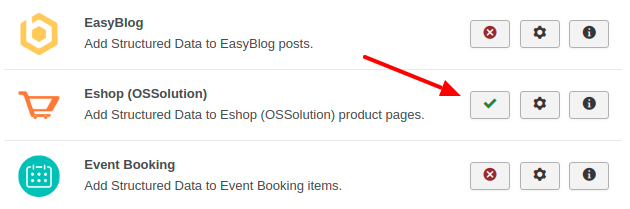
Find the "Eshop" Integration in the list and make sure that it is enabled with the green checkmark indicator as shown in the screenshot below.
Add Product Structured Data to Eshop Pages
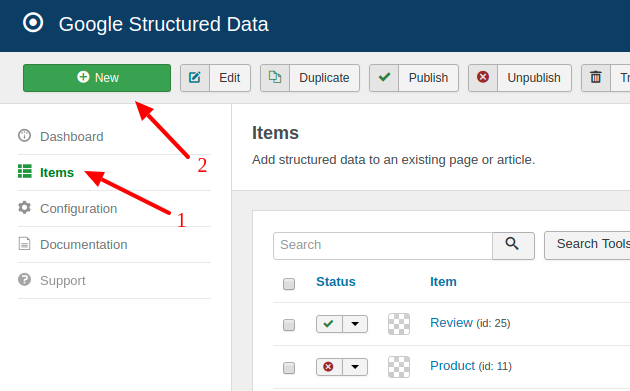
Let's see how you can add the Product Content Type to Eshop pages. Go to Components → Google Structured Data → Items and click New to create a new structured data item.
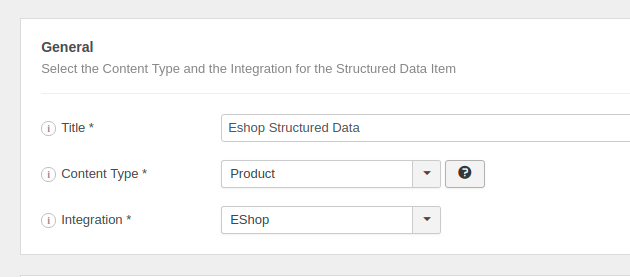
Enter a Title, then select the Product content type and the EShop integration. Integration View is filled in automatically with Product Detail.
Once you pick a content type and an integration, the form reloads and 2 new sections appear:
- Product: This section helps you map the content type properties with page fields, custom fields, site info or custom values.
- Publishing Rules: This is where you can select the pages where the structured data is going to be generated to.
To learn more details on how you can use these sections visit the How to Add Structured Data to Pages documentation page.
Publishing Rules
In case, you don't want to generate the Product Content Type to all pages, you can use the available publishing rules to target specific pages. Each rule is Disabled by default. Set it to Include or Exclude and pick the items. The Eshop Integration implements the following publishing rules:
| Name | Description |
|---|---|
| Product | Target specific Eshop Products only. |
| Category | Target all products assigned to specific Eshop categories. |
To learn more about the Publishing Rules section visit the How to add Structured Data to Pages documentation page.
Remember, in case you don't enable any publishing rules, the structured data will be generated on all Eshop pages.
Notes
The Structured Data is generated only in the Product detailed page view where a single Eshop Product is displayed. The Category or List views are not currently supported.
Eshop Structured Data is available in Pro
Unlock this and dozens of other powerful features by upgrading to Google Structured Data Pro.
Unlock this feature
Last updated on Oct 15th 2026 17:10
Schema and Structured Data Extension for Joomla
Markup your content with structured data and enhance the appearance of your website with rich results. Boost Joomla SEO in a few clicks.

Tassos offers a premium suite of Joomla extensions with 7 products and over 2.4 million downloads, providing reliable solutions since 2014.


 Rated:
Copyright © 2014 - 2026 - Smile Motive Development LP. All Rights Reserved.