

-
- DJ-Catalog2
- DJ-Classifieds
- DJ-Events
- DPCalendar
- EasyBlog
- Eshop
- Event Booking
- Gridbox
- HikaShop
- iCagenda
- J2Commerce
- JBusiness Directory
- JCal Pro
- JEvents
- Joomla Articles
- Joomla Menu Manager
- JoomShopping
- JReviews
- K2
- OSCampus Structured Data
- Quix Page Builder
- RSBlog
- RSEventsPro
- SEO Glossary
- SobiPro
- SP Page Builder
- VirtueMart
- YOOtheme
- ZOO
-
- Troubleshoot Structured Data not Added to the Page
- Troubleshoot Structured Data not Identified by the Google Rich Results Tool
- Troubleshoot Structured Data not Showing in Search Results
- Preview button not showing on Structured Data Testing Tool
- I am seeing the "is not a known valid target type for the identifier property" error
- Fixing Error decoding JSON data in Joomla Articles
- Fix missing Google Structured Data tab in the Article Editing Page
-
- How to map schema properties using CSS Selectors
- How to Export and Import Google Structured Data Items
- HTML to Markdown Conversion
- Adding Facebook Open Graph Meta Data
- Site Representation Settings
- Use Structured Data for Google Merchant
- Create Multilingual Structured Data Items
- Use the Custom Code Content Type
- Prepare Content option
- Using the Schema Cleaner
Social Profile Structured Data
Add your social profile information to a Google knowledge panel
You can add your social profile information to a Google Knowledge panel. Knowledge panels prominently display your social profile information in some Google Search results. You can easily do that by following the steps below.
Navigate to Components → Google Structured Data → Configuration
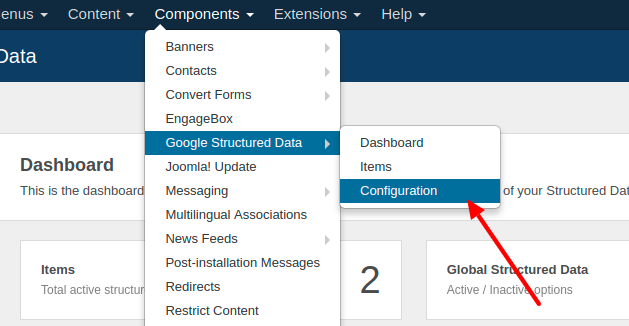
Open the Site Representation tab and scroll to Social Profiles.
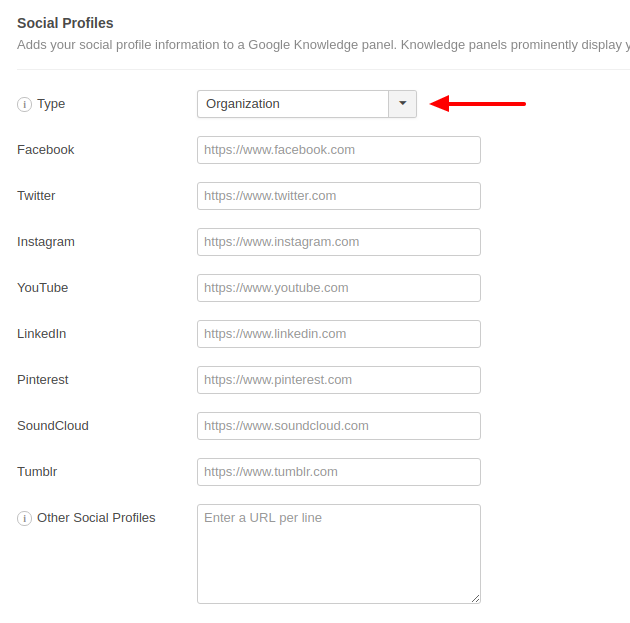
Whether your Joomla website is about an Organization or a Person is set with Representation Type at the top of the tab.
Then, as it is apparent from the extensive list of social networks, you should fill out the profile URLs for each Social Network that you have registered in. Leave blank those that you don't have a profile in.
Finally, in case you have other social profiles as well which do not have their own text field, you can enter their URLs, one per line, in the Other Profiles field at the bottom.
Once you are done, click Save.
Guidelines
In addition to the general structured data guidelines, Social Profile markup should follow these guidelines:
- The social profiles in your markup must correspond to what users see on the same page.
Supported Social Profiles
Here's a list of the supported social profiles:
- X (Twitter)
- TikTok
- YouTube
- Any other profile, via Other Profiles
Resources
Here's a list of useful resources to read more about this structured data type and troubleshoot any issues you may encounter.



 Rated: