

Unlock this and dozens of other powerful features by upgrading to Google Structured Data Pro.
Unlock this feature
-
- DJ-Catalog2
- DJ-Classifieds
- DJ-Events
- DPCalendar
- EasyBlog
- Eshop
- Event Booking
- Gridbox
- HikaShop
- iCagenda
- J2Commerce
- JBusiness Directory
- JCal Pro
- JEvents
- Joomla Articles
- Joomla Menu Manager
- JoomShopping
- JReviews
- K2
- OSCampus Structured Data
- Quix Page Builder
- RSBlog
- RSEventsPro
- SEO Glossary
- SobiPro
- SP Page Builder
- VirtueMart
- YOOtheme
- ZOO
-
- Troubleshoot Structured Data not Added to the Page
- Troubleshoot Structured Data not Identified by the Google Rich Results Tool
- Troubleshoot Structured Data not Showing in Search Results
- Preview button not showing on Structured Data Testing Tool
- I am seeing the "is not a known valid target type for the identifier property" error
- Fixing Error decoding JSON data in Joomla Articles
- Fix missing Google Structured Data tab in the Article Editing Page
-
- How to map schema properties using CSS Selectors
- How to Export and Import Google Structured Data Items
- HTML to Markdown Conversion
- Adding Facebook Open Graph Meta Data
- Site Representation Settings
- Use Structured Data for Google Merchant
- Create Multilingual Structured Data Items
- Use the Custom Code Content Type
- Prepare Content option
- Using the Schema Cleaner
JoomShopping Structured Data
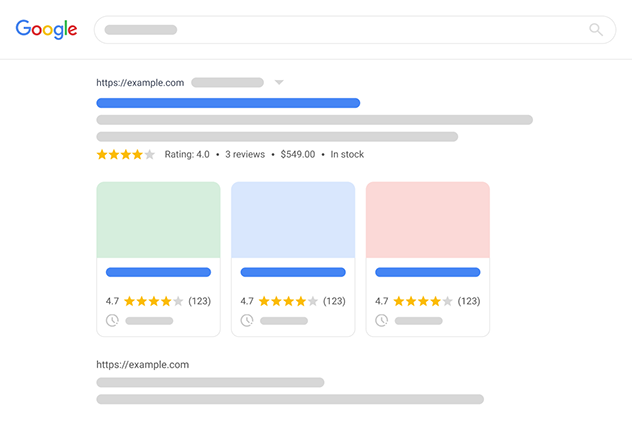
Add product structured data to all JoomShopping products. Display prices, ratings, and availability in search results. Help customers find your Joomla store items.
JoomShopping Structured Data is available in Pro
Google Structured Data lets you add the Product content type to your JoomShopping product pages. First, make sure the integration is enabled.
Enable Integration
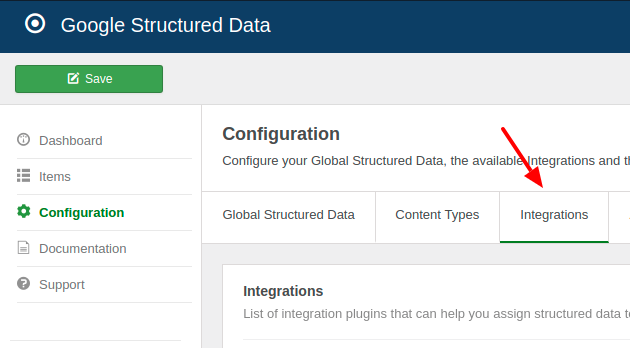
As with all of the integrations, go to Components → Google Structured Data → Configuration and open the Integrations tab, where all integrations are listed.
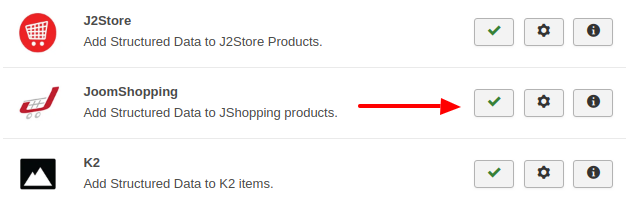
Find the "JoomShopping" Integration in the list and make sure that it is enabled with the green checkmark indicator as shown in the screenshot below.
Add Product Structured Data to JoomShopping Pages
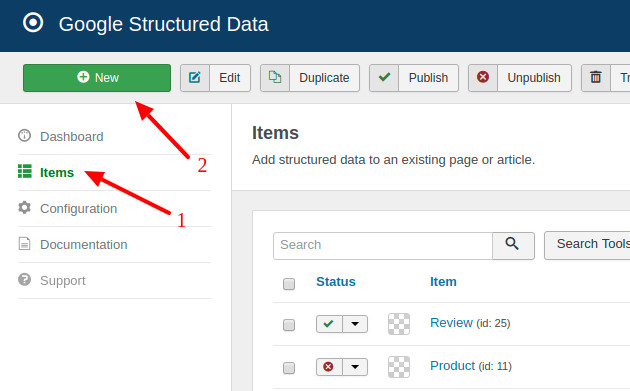
Let's see how you can add the Product Content Type to JoomShopping Pages. Go to Components → Google Structured Data → Items and click New to create a new structured data item.
Enter a Title, then select the Product content type and the JoomShopping integration. Integration View is filled in automatically with Product Detail.
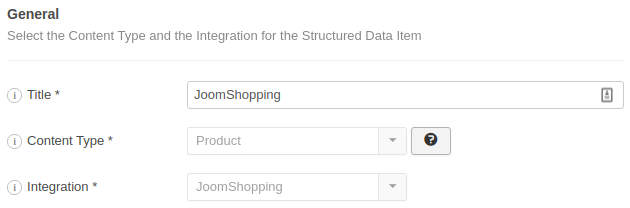
Once you pick a content type and an integration, the form reloads and 2 new sections appear:
- Product: This section helps you map the content type properties with page fields, custom fields, site info or custom values.
- Publishing Rules: This is where you can select the pages where the structured data is going to be generated to.
To learn more details on how you can use these sections visit the How to Add Structured Data to Pages documentation page.
Publishing Rules
In case, you don't want to generate the Product Content Type to all pages, you can use the available publishing rules to target specific pages. Each rule is Disabled by default. Set it to Include or Exclude and pick the items. The JoomShopping Integration implements the following publishing rules:
| Name | Description |
|---|---|
| Product | Target specific JoomShopping Products only. |
| Category | Target all JoomShopping products assigned to specific categories. This rule affects newly created items as well. |
To learn more about the Publishing Rules section visit the How to add Structured Data to Pages documentation page.
Remember, in case you don't enable any publishing rules, the structured data will be generated on all JoomShopping Pages.
Notes
The Structured Data is generated only in the Product View of the JoomShopping component where a single Product is displayed. The Category or List views are not currently supported.
JoomShopping Structured Data is available in Pro
Unlock this and dozens of other powerful features by upgrading to Google Structured Data Pro.
Unlock this feature
Last updated on Oct 15th 2026 17:10
Schema and Structured Data Extension for Joomla
Markup your content with structured data and enhance the appearance of your website with rich results. Boost Joomla SEO in a few clicks.

Tassos offers a premium suite of Joomla extensions with 7 products and over 2.5 million downloads, providing reliable solutions since 2014.


 Rated:

Copyright © 2014 - 2026 - Smile Motive Development LP. All Rights Reserved.