

-
- DJ-Catalog2
- DJ-Classifieds
- DJ-Events
- DPCalendar
- EasyBlog
- Eshop
- Event Booking
- Gridbox
- HikaShop
- iCagenda
- J2Commerce
- JBusiness Directory
- JCal Pro
- JEvents
- Joomla Articles
- Joomla Menu Manager
- JoomShopping
- JReviews
- K2
- OSCampus Structured Data
- Quix Page Builder
- RSBlog
- RSEventsPro
- SEO Glossary
- SobiPro
- SP Page Builder
- VirtueMart
- YOOtheme
- ZOO
-
- Troubleshoot Structured Data not Added to the Page
- Troubleshoot Structured Data not Identified by the Google Rich Results Tool
- Troubleshoot Structured Data not Showing in Search Results
- Preview button not showing on Structured Data Testing Tool
- I am seeing the "is not a known valid target type for the identifier property" error
- Fixing Error decoding JSON data in Joomla Articles
- Fix missing Google Structured Data tab in the Article Editing Page
-
- How to map schema properties using CSS Selectors
- How to Export and Import Google Structured Data Items
- HTML to Markdown Conversion
- Adding Facebook Open Graph Meta Data
- Site Representation Settings
- Use Structured Data for Google Merchant
- Create Multilingual Structured Data Items
- Use the Custom Code Content Type
- Prepare Content option
- Using the Schema Cleaner
Site Name Structured Data
Indicate the preferred name you want Google Search to display in Search results.
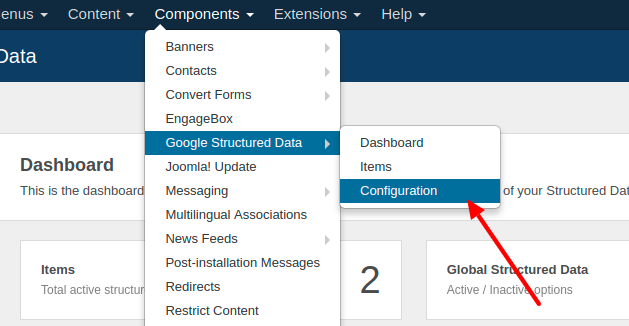
To indicate the preferred name you want Google to display in Search results navigate to Components → Google Structured Data → Configuration
Open the Site Representation tab.
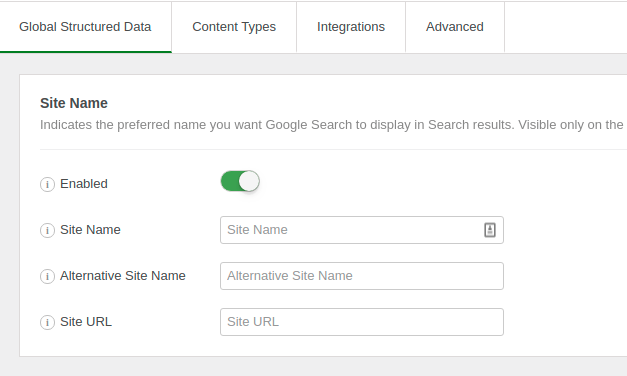
The fields which can be filled for the Sitename Snippet are the following:
- Add Structured Data to: Found under Generate Structured Data. Choose where the site name is added: Homepage, Selected Pages or Nowhere.
- Website Name: The preferred name of your website. If left blank, the default site name as set on the configuration will be used instead.
- Alternate Website Name: You can provide an alternate name for your site, and let Google Search algorithms choose the most relevant between the Site Name and the Alternate Name (optional).
How to translate the Site Name?
In case you're on a multi-lingual site and you'd like to generate the Site Name schema translated into each language, follow the steps below:
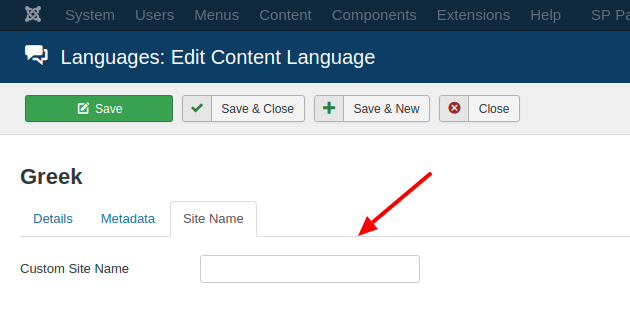
Step 1: Translate Site Name in the Languages section
Go to System → Manage → Content Languages and edit each language. On the Options tab, enter the translated name in Custom Site Name, as shown in the picture below:
Step 2: Leave the Website Name option empty
Go to Components → Google Structured Data → Configuration, open the Site Representation tab and leave Website Name empty. In that way, the Site Name set in the Joomla! Global Configuration page and in the Content Languages section will be used instead.
Note
By default the site name is added on the homepage only. You can change this with Add Structured Data to.



 Rated: