

-
- DJ-Catalog2
- DJ-Classifieds
- DJ-Events
- DPCalendar
- EasyBlog
- Eshop
- Event Booking
- Gridbox
- HikaShop
- iCagenda
- J2Commerce
- JBusiness Directory
- JCal Pro
- JEvents
- Joomla Articles
- Joomla Menu Manager
- JoomShopping
- JReviews
- K2
- OSCampus Structured Data
- Quix Page Builder
- RSBlog
- RSEventsPro
- SEO Glossary
- SobiPro
- SP Page Builder
- VirtueMart
- YOOtheme
- ZOO
-
- Troubleshoot Structured Data not Added to the Page
- Troubleshoot Structured Data not Identified by the Google Rich Results Tool
- Troubleshoot Structured Data not Showing in Search Results
- Preview button not showing on Structured Data Testing Tool
- I am seeing the "is not a known valid target type for the identifier property" error
- Fixing Error decoding JSON data in Joomla Articles
- Fix missing Google Structured Data tab in the Article Editing Page
-
- How to map schema properties using CSS Selectors
- How to Export and Import Google Structured Data Items
- HTML to Markdown Conversion
- Adding Facebook Open Graph Meta Data
- Site Representation Settings
- Use Structured Data for Google Merchant
- Create Multilingual Structured Data Items
- Use the Custom Code Content Type
- Prepare Content option
- Using the Schema Cleaner
Breadcrumbs Structured Data
Indicate each inner page position in the site hierarchy automatically.
Google Search can indicate the current page's position in the website's hierarchy with Breadcrumbs structured data, which is enabled by default. To review or change it, follow the steps below.
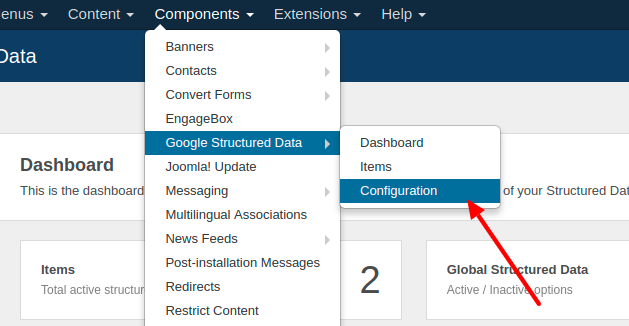
Navigate to Components → Google Structured Data → Configuration
Open the Breadcrumbs tab.
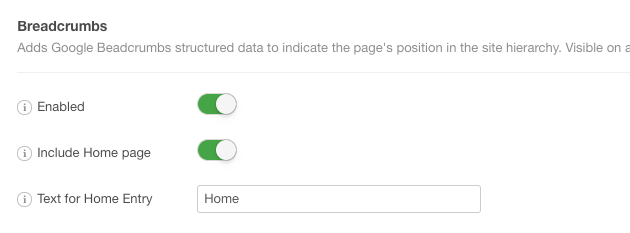
Make sure Enabled is on. Use Homepage Link to include the home page as the first item, and Text for Homepage Link to change its name. If you leave Text for Homepage Link empty, Home is used. If you use Joomla's Breadcrumbs module, turn on Remove Joomla Schema to remove the module's own breadcrumbs markup and avoid duplicates.
Once you are done, click "Save".
How to fix Breadcrumbs structured data errors
When you test your structured data via a tester such as the Rich Results Test, you may have face duplicate BreadcrumbList structured data in your page. This phenomenon occurs when your Joomla! template or a 3rd-party extension injects microdata into your page's document.
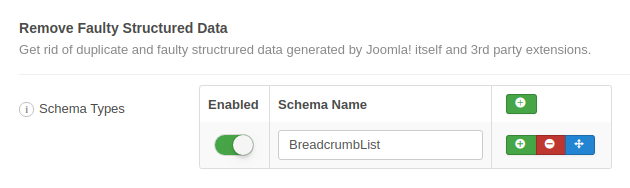
If the duplicate comes from Joomla's Breadcrumbs module, turn on Remove Joomla Schema in the Breadcrumbs tab. For other extensions, add BreadcrumbList under Schema Cleaner in the Tools tab, as seen below:
Note: This is a Pro feature and is only available in the Pro version of Google Structured Data
Google Search Console is reporting errors about my Breadcrumb data
Google Search Console is not a real-time tool so it requires some time to reflect the changes you make. That's why you may need to press the VALIDATE FIX button to start re-checking your pages for structured data errors.
Note
Joomla! by default comes along with a Breadcrumbs module which can, in a way, do the same job but has a few disadvantages in relation to Google Structured Data extension.
- You have to create and enable the module via the Module Manager.
- You have to assign it to all the pages.



 Rated: