

-
-
- Submit Updated Articles to Bing and Yandex with IndexNow in Joomla
- Add Published and Modified Date Meta Tags to Joomla
- Add Open Graph and Twitter Card Tags to Joomla
- Auto-Generate Meta Descriptions from Article Text in Joomla
- Add Noindex to Specific Pages in Joomla
- Verify Your Joomla Site with Google Search Console
-
- Add a View as Markdown Link to Joomla Articles
- Display the Last Modified Date in Joomla Articles
- Embed Iframes in Joomla
- Automatically Link Twitter (X) @mentions in Joomla Articles
- Open External Links in a New Tab in Joomla
- Display Estimated Reading Time in Joomla Articles
- Replace Old URLs in Joomla
- Search and Replace in Joomla
-
- Add a Footer Line to the Joomla Administrator
- Show a Staging Banner in the Joomla Administrator
- Remove the "All" Option from Admin List Limits in Joomla
- Add a Cookie Consent Banner to Joomla
- Make the Administrator Navigation Sticky in Joomla
- Add Google Fonts to Joomla
- Add a Facebook Messenger Chat Button to Joomla
- Add a Reading Progress Bar to Joomla
- Add a Custom Scrollbar to Joomla
- Show Confetti on a Thank You Page in Joomla
- Add Smooth Scrolling to Joomla
- Add a Back to Top Button in Joomla
- Add a WhatsApp Chat Button in Joomla
-
- Protect the Administrator with a Secret URL Key in Joomla
- Show a Welcome Message on First Login in Joomla
- Log Out Idle Administrators in Joomla
- Assign New Users to a Different User Group Automatically in Joomla
- Redirect Visitors by Country in Joomla
- Redirect Users After Login by User Group in Joomla
- Block User Registration with Certain Usernames in Joomla
- Block User Registration by Country in Joomla
- Block User Registration by Email Address in Joomla
- Block User Registration by IP Address in Joomla
- Remove the Forgot Password and Username Links in Joomla
- Remove the Generator Meta Tag in Joomla
- Let Users Log In with Their Email Address in Joomla
- Block Traffic by Country in Joomla
- Block Bot Traffic in Joomla
- Block Traffic by IP Address in Joomla
Conditional Logic
Load code snippets only when it matches specific conditions such as logged-in user, specific page URL, , date time, device type, visitor country.
A snippet runs on every page of your site until you tell it otherwise. Conditional logic is how you tell it otherwise.
Load the Facebook Pixel everywhere except checkout. Show a promo bar on the homepage, on mobile, during a sale week. Run a PHP snippet only for logged-in members. All of it happens in the Conditional Logic tab, with no code.
How it works
3 pieces stack up:
- A condition is one test, like Device Type is Mobile.
- A condition set holds one or more conditions and decides whether all or any of them have to match.
- Your snippet displays when at least one condition set passes.
So conditions inside a set are joined by AND (or OR, if you switch the set to any), and the sets themselves are always joined by OR.
Set 1:  Menu Item is Home  AND  Device Type is Mobile
                       -- OR --
Set 2:  URL contains /blog
That rule shows the snippet on the mobile homepage, or anywhere under /blog.
Conditions are evaluated identically whether the snippet is injected at an auto-insert location like Site Header, or placed by hand with a shortcode. When the conditions don't pass, the shortcode prints nothing.
Choose where a snippet runs
Open a snippet and click the Conditional Logic tab.
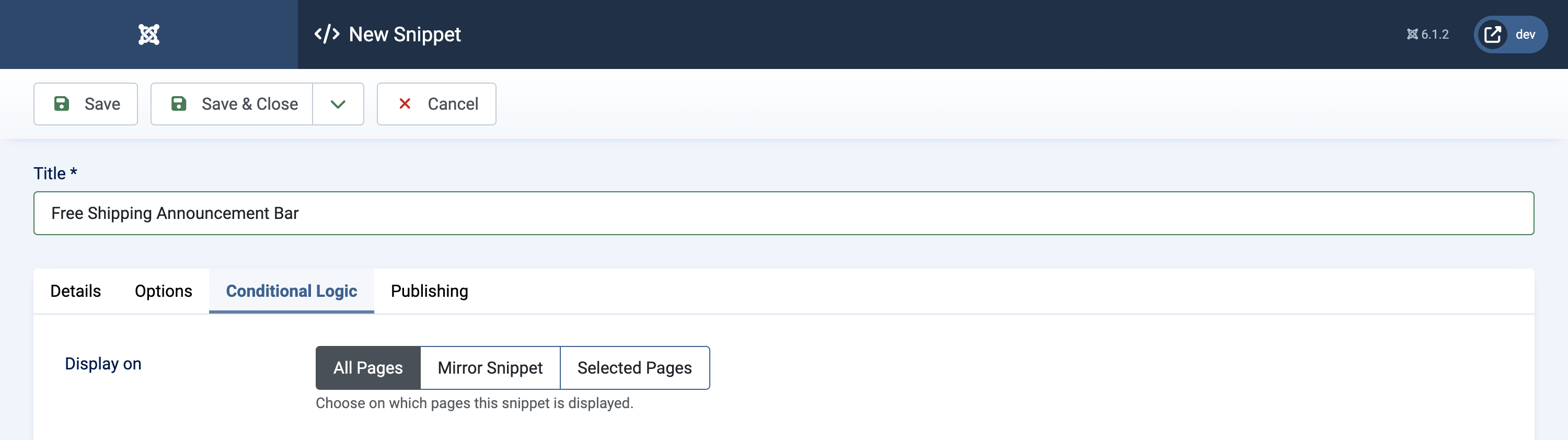
| Display on | What it does |
|---|---|
| All Pages | The snippet always runs. This is the default. |
| Mirror Snippet | The snippet borrows another snippet's conditions. See Reuse conditions with Mirror Snippet. |
| Selected Pages | The snippet runs only when your conditions pass. Picking this opens the condition builder. |
Set up your first rule
The walkthrough below builds the rule sketched above. It works the same on any snippet, whatever the code type.
-
Log into your Joomla backend.
-
Go to Components → Code Snippets.
-
Open a snippet, or click New to create one.
-
Click the Conditional Logic tab.
-
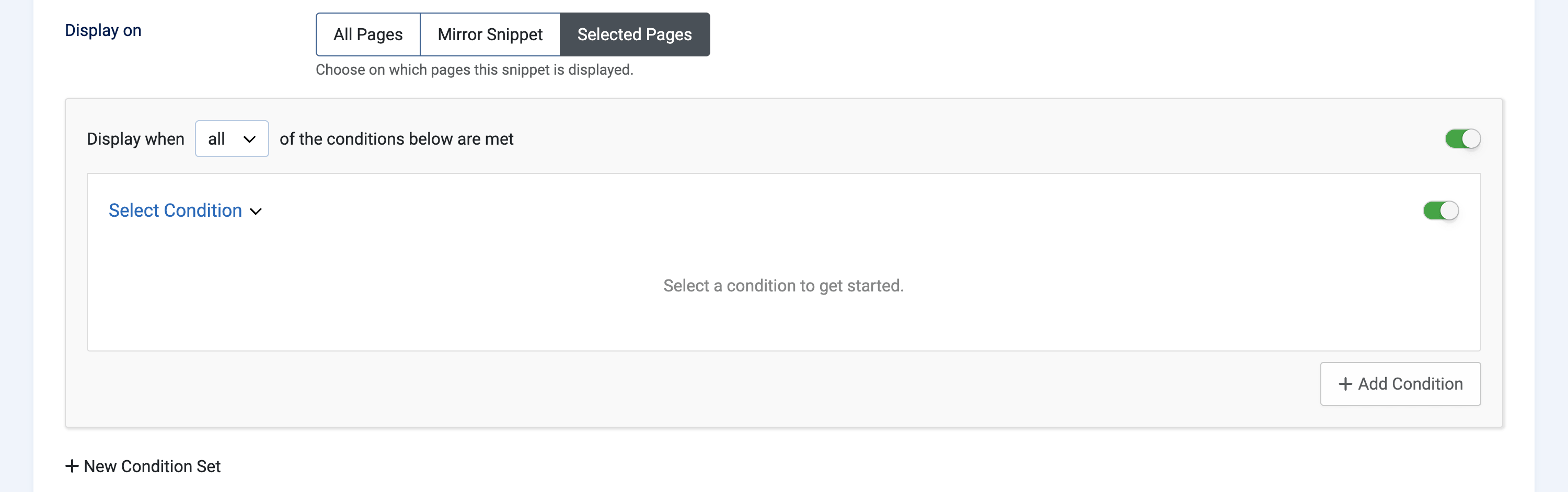
Click Selected Pages. An empty condition set appears, reading Display when all of the conditions below are met.
-
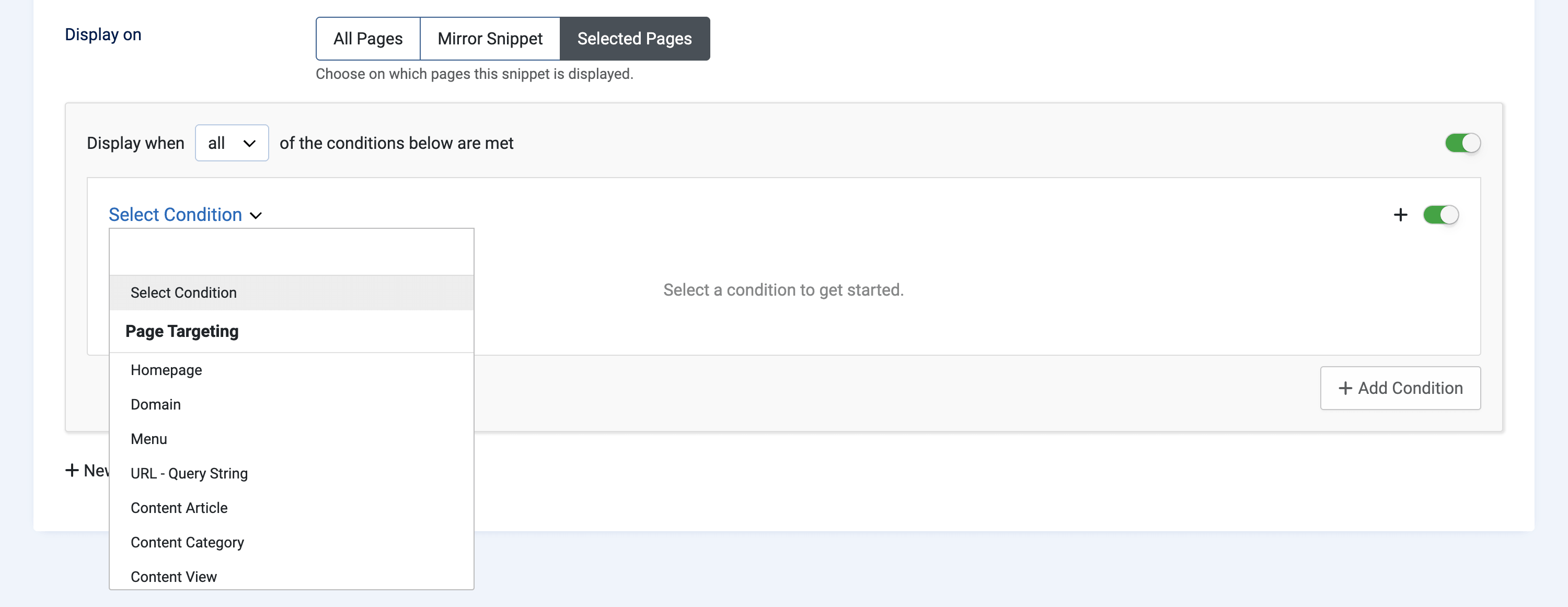
Click Select Condition. Conditions are grouped the way the picker lists them: Page Targeting, User Targeting, Date & Time, eCommerce, Integrations, Other. Start typing to filter the list.
-
Choose Menu. The condition expands into an operator (Is / Is not) and the menu items to match.
-
Tick Home in the menu item list.
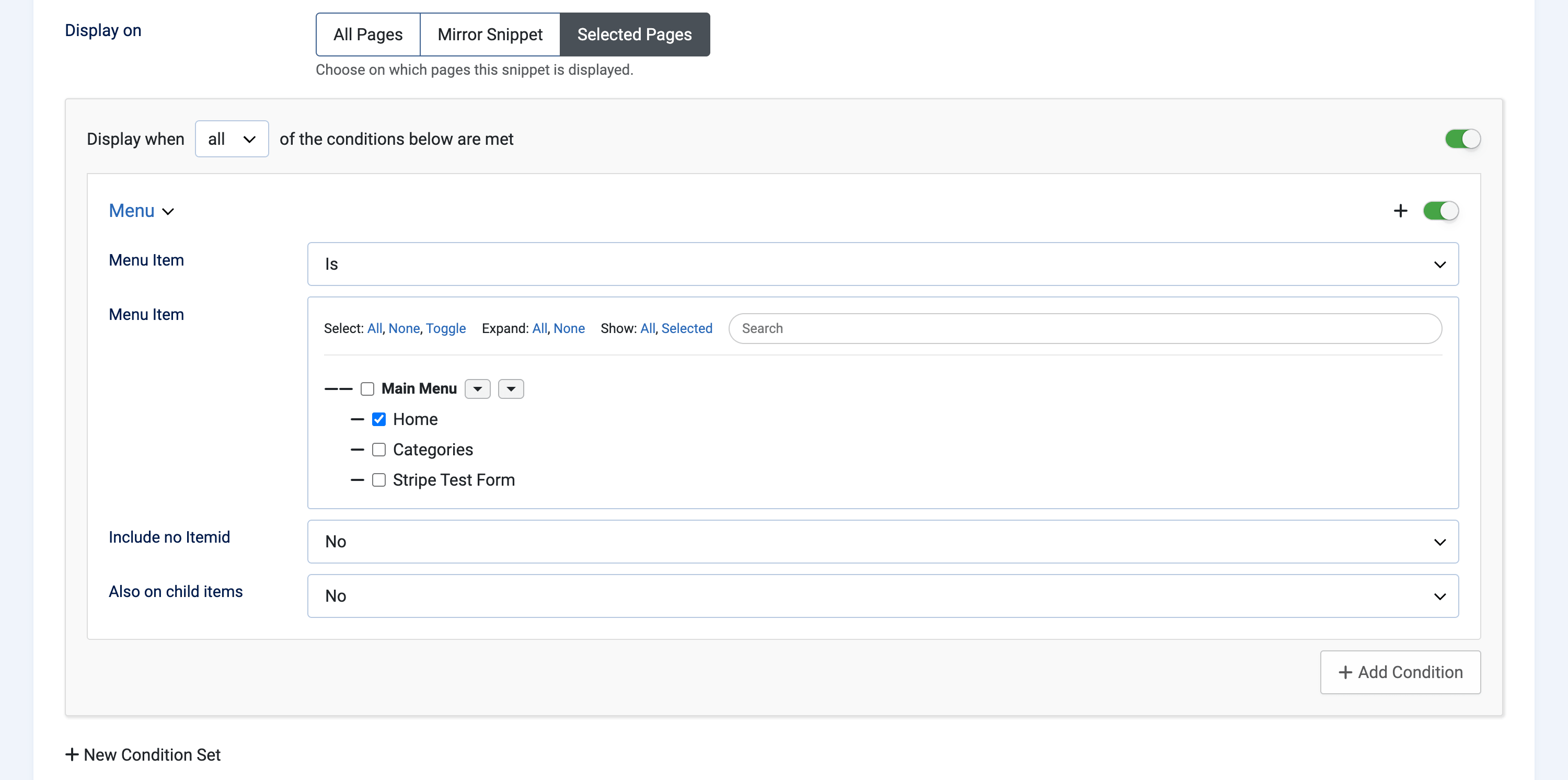
Most conditions follow this shape: an operator, then a value. Some carry extras. Menu can reach child items, and URL can switch to pattern matching.
-
Click Add Condition.
-
Choose Device Type.
-
Pick Mobile. Since the set is on all, both conditions have to be true now.
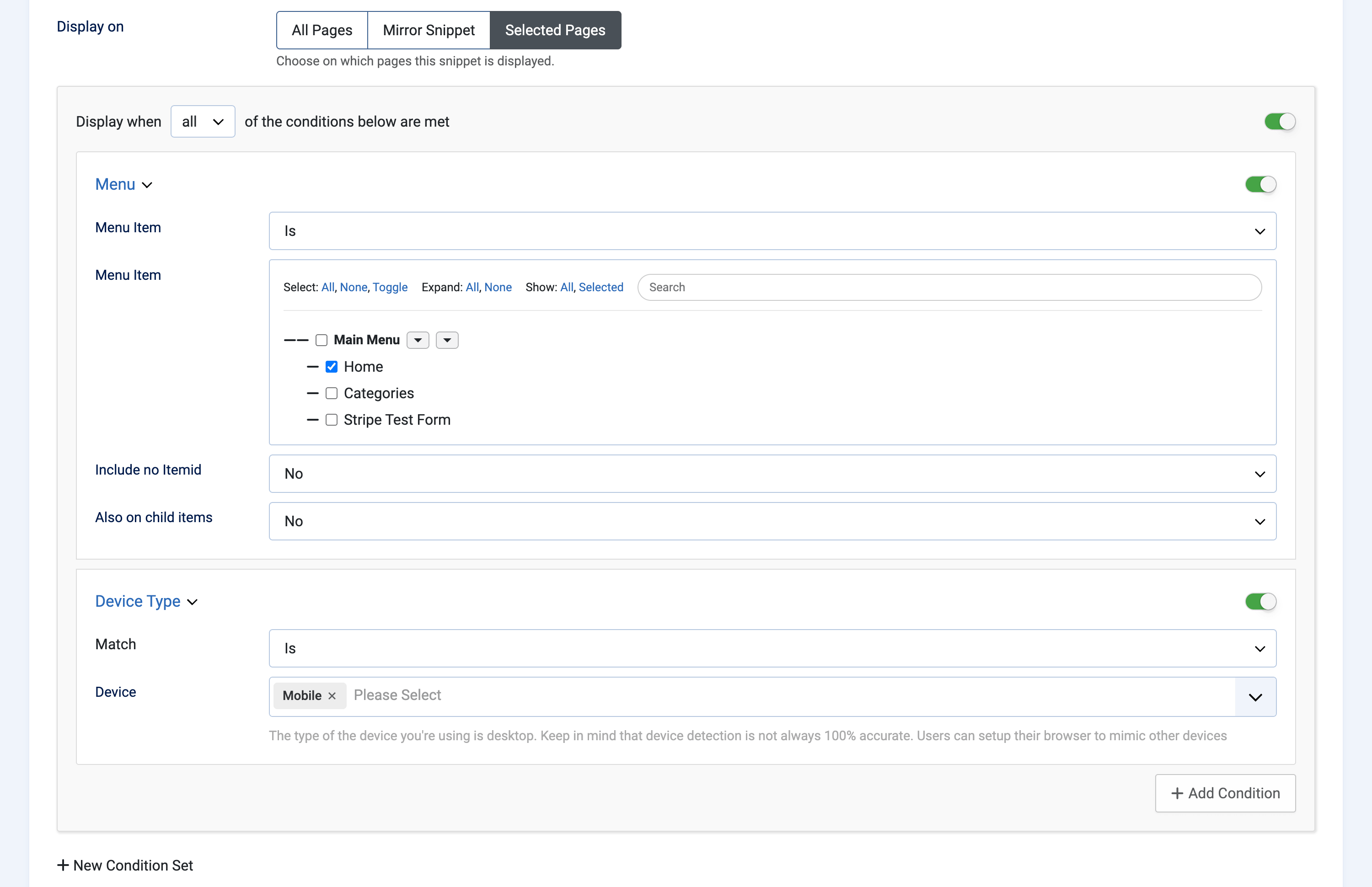
-
Change the set's dropdown from all to any. The same 2 conditions now mean Home menu item or mobile device.
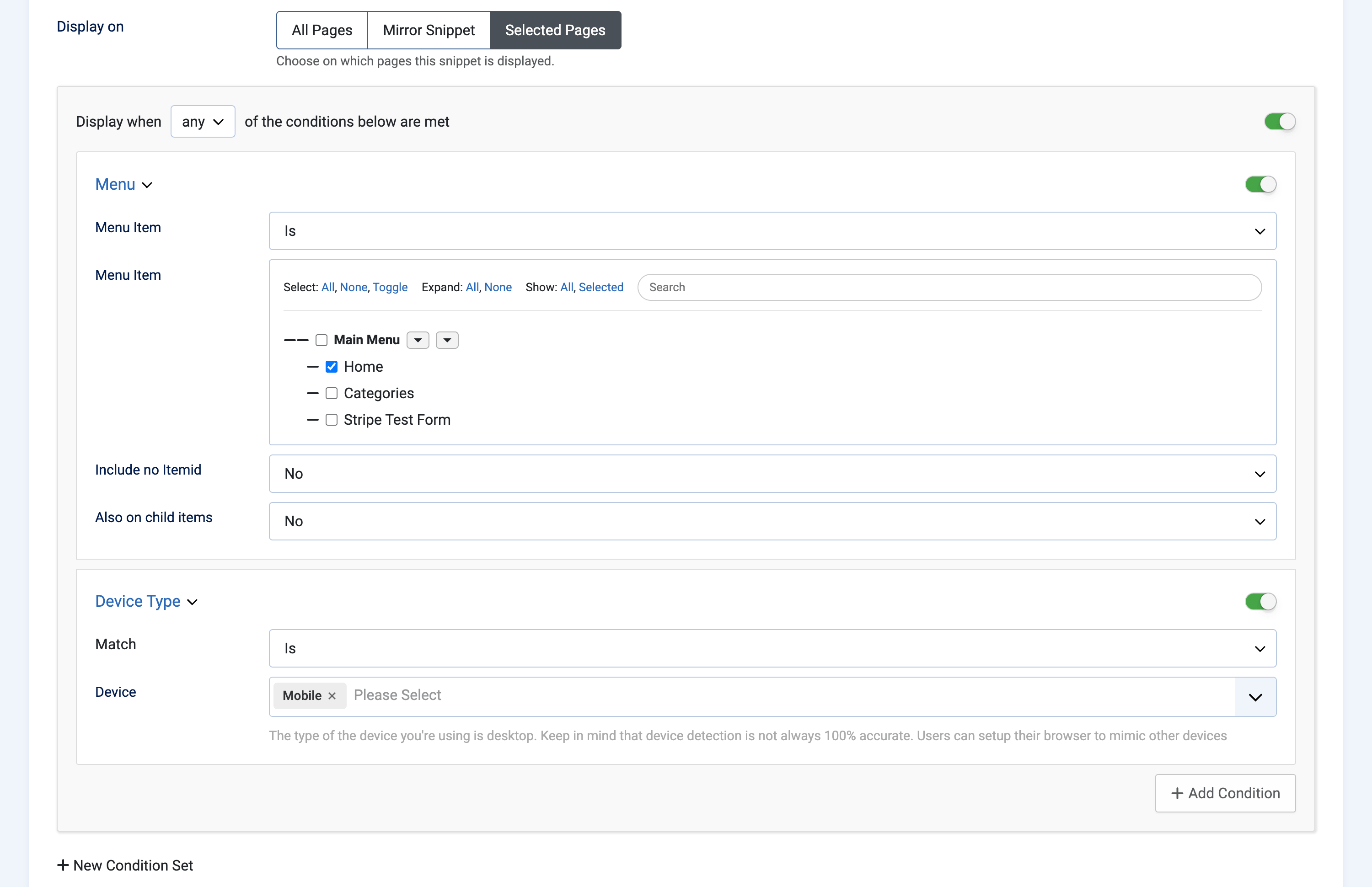
-
Switch the dropdown back to all.
-
Click New Condition Set.
-
Add a URL - Query String condition to the new set.
-
Type
/blogin the URL field.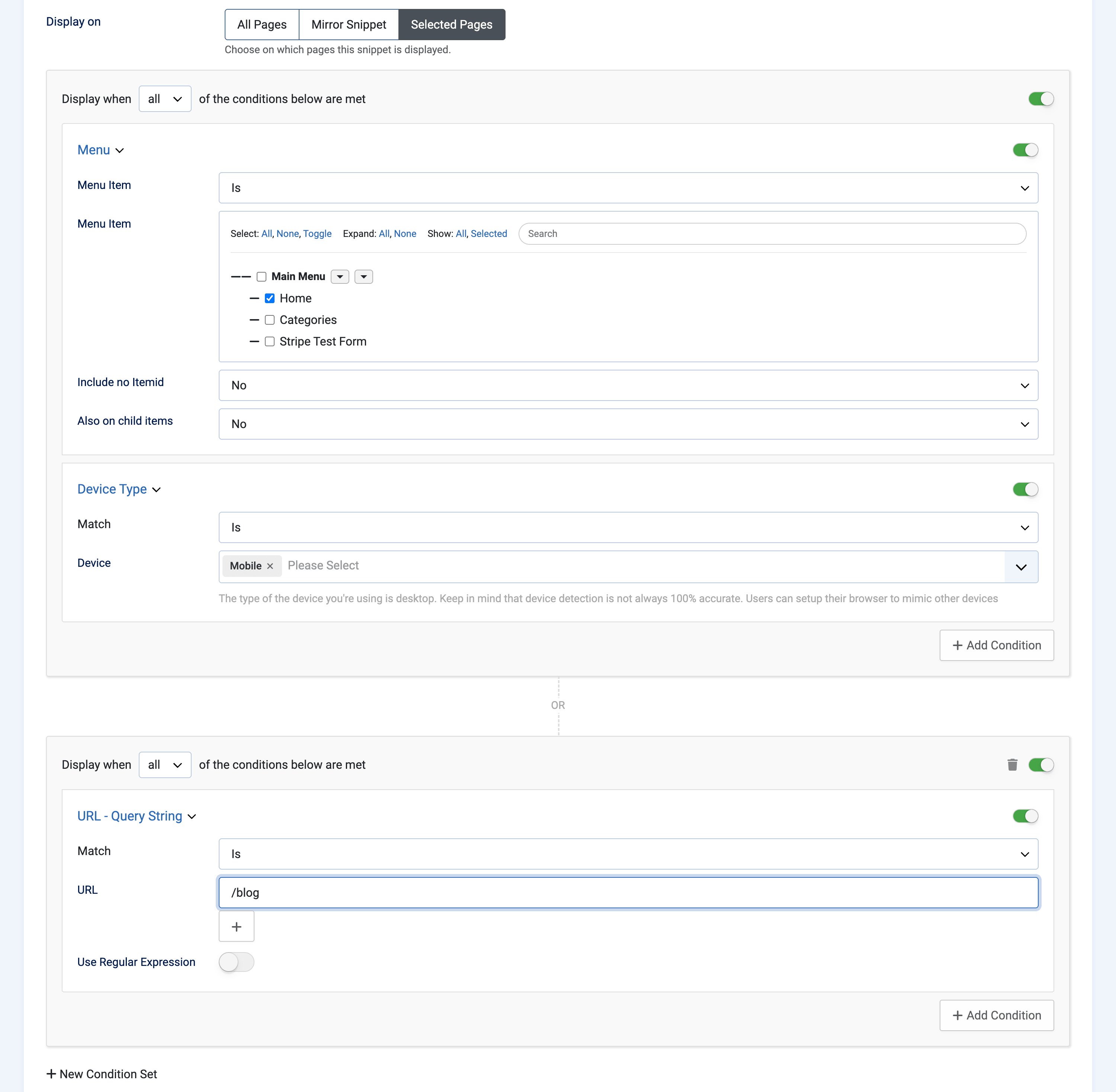
-
Click Save.
-
Load your site and check a page that should get the snippet, then one that shouldn't.
Tip: most conditions print a live hint under the field telling you what they detect right now. The Device Type condition, for example, reports the device you're browsing with. It's the fastest way to confirm a condition sees what you think it sees.
Turn conditions on and off
Every condition and every condition set has a toggle on the right. Flipping it off keeps the condition saved but skips it during evaluation, which makes it easy to find the one condition that's blocking a snippet without deleting your work.
The trash icon deletes a set along with everything in it.
Warning: a snippet on Selected Pages with no enabled conditions left behaves exactly like All Pages, so it runs site-wide. If you switch everything off while debugging, the snippet is live everywhere until you switch something back on.
Conditions reference
Conditions that depend on another extension (Convert Forms, EngageBox, K2, VirtueMart, HikaShop, AcyMailing, Akeeba Subscriptions) only show up once that component is installed.
Page targeting
| Condition | Matches on |
|---|---|
| Homepage | Whether the visitor is on your homepage. |
| Domain | The current domain, handy on multi-domain and staging setups. |
| Menu | The active menu item. Also on child items takes No, Yes, or Only (child items but not the selected item itself), and Include no Itemid covers pages with no menu item at all. |
| URL - Query String | Whether the current URL contains any value you list, query string included. Flip Use Regular Expression on to match a pattern instead. |
| Content Article | Specific Joomla articles. |
| Content Category | Articles in specific categories. |
| Content View | The com_content view: featured, category blog, single article, and so on. |
| Content Tag | Articles carrying specific tags. |
User targeting
| Condition | Matches on |
|---|---|
| User | Specific user accounts. |
| User Group | Joomla user groups such as Registered, Author, Super Users. |
| User Access Level | Joomla view access levels such as Public, Registered, Special. |
| New vs Returning | Whether this is a first visit or a return visit. |
| IP Address | One or more visitor IP addresses. Useful alongside blocking IP addresses outright. |
| Device Type | Desktop, tablet or mobile, read from the user agent. |
| Country, City, Continent, Region | Where the visitor is, the same geolocation used to redirect visitors by country. Needs a GeoIP database, and the condition shows a download link when one isn't installed. |
| Time on Site | Seconds since the visit started, compared with is equal to, does not equal, fewer than, fewer than or equal to, greater than or greater than or equal to. |
| Pageviews Count | How many pages the visitor has seen this visit, with the same 6 operators as Time on Site. |
| Operating System | Windows, macOS, Linux, iOS, Android, BlackBerry, ChromeOS. |
| Browser | Chrome, Firefox, Safari, Edge, Internet Explorer, Opera. |
Date and time
| Condition | Matches on |
|---|---|
| Date | Whether now falls between a start and an end date, so a campaign expires on its own. |
| Time | A time-of-day range like 09:00 to 17:00. |
| Day of Week | Specific weekdays, plus Weekend and Weekdays shortcuts. |
| Month | Specific months. |
The Date condition takes its dates in your Joomla user's timezone and stores them as UTC. Time, Day of Week and Month are checked against the site timezone from System → Global Configuration, so they follow the site rather than whoever edited the snippet.
eCommerce
For VirtueMart and HikaShop alike: cart contains products, cart contains X products, cart value, current product, current product category, current category view, current product price, current product stock, purchased product, last purchased date, and total spend.
Integrations
Convert Forms Campaign, Convert Forms Form, EngageBox, AcyMailing List, Akeeba Subscriptions Levels, and K2 (item, category, tag, page type).
Other
| Condition | Matches on |
|---|---|
| Component | The component rendering the page, like com_content or com_contact. |
| Language | The active site language. |
| Referrer URL | Where the visitor came from. |
| Cookie | A cookie's presence or value, with exists, is empty, is equal to, contains, starts with and ends with. Pairs well with custom session variables. |
| PHP | Your own PHP check. See below. |
Write your own check with PHP
When nothing in the list fits, the PHP condition hands the decision to you. It runs the same way a custom PHP snippet does, except your code has to return a value, and the snippet displays when that value is truthy.
These variables are already in scope, so there's no need to fetch them yourself:
| Variable | Holds |
|---|---|
$app, $mainframe |
The Joomla application |
$document, $doc |
The current document |
$database, $db |
The database driver |
$user |
The current user |
$Itemid |
The active menu item id |
// Only on the 1st of the month
return date('j') === '1';
// Only for members of a specific user group
return in_array(10, $user->getAuthorisedGroups());// Only for traffic from a specific campaign
return $app->input->get->get('utm_campaign', '', 'STRING') === 'spring-sale';Warning: code that finishes without hitting a
returnpasses, and the snippet then shows on every page. If a PHP condition looks like it's being ignored, check that every path returns something.
A few more things to keep in mind:
- Anything your code echoes gets thrown away. Only the returned value counts.
- It runs on every page load, so keep it cheap. No database queries, no remote calls.
- It's still one condition. Combine it with the built-in ones instead of rebuilding them in PHP.
- Read request data through
$app->inputwith an explicit filter, never$_GET,$_POSTor$_COOKIE. The input object applies Joomla's filtering, the superglobals hand you raw values. - Some functions are blocked for safety, and code containing any of them won't run at all:
eval,exec,system,passthru,shell_exec,proc_open,proc_close,pcntl_exec,popen,fopen,unlink,rmdir,symlink,dl,escapeshellarg,escapeshellcmd,create_function, and backticks.curl_execis allowed.
Reuse conditions with Mirror Snippet
Related snippets often need identical targeting. A tracking script, its consent banner and its conversion pixel might all belong on the same pages.
Set the targeting up once on the first snippet, then switch the others to Mirror Snippet and point them at it. Mirrored snippets read the source snippet's conditions live, so editing the rule once updates all of them.
If the mirrored snippet is missing, unpublished, or the chain loops back on itself, the snippet falls back to running on all pages rather than vanishing quietly.
Common setups
| Goal | Rule |
|---|---|
| Everywhere except checkout | URL - Query String is not checkout (this excludes any URL containing the word, query strings included) |
| Homepage only | Homepage is on homepage |
| One blog category | Content Category is Blog, the usual way to scope ads inside articles |
| Mobile visitors only | Device Type is Mobile |
| A campaign with an expiry date | Date is between the start and end dates |
| Weekend office hours banner | Day of Week is Weekend, plus Time is between 09:00 and 17:00 |
| Members only | User Group is Registered |
| One country | Country is Greece |
| A noindex tag on specific pages | Menu is the pages you want out of the index, on a noindex snippet |
| Homepage or blog | 2 sets: Homepage, and URL - Query String contains /blog |
| Members everywhere except one country | User Group is Registered, plus Country is not Germany |
Troubleshooting
The snippet shows everywhere even though I set conditions. Check that Display on is on Selected Pages, because conditions are ignored on All Pages. Then check that at least one condition is still enabled, since an empty or fully disabled rule counts as no restriction.
The snippet never shows. Rule out the snippet itself first: switch Display on to All Pages and reload. If it still doesn't appear, the problem is the snippet, not the targeting. If it does appear, the conditions are the problem, and it's usually a set that's too tight. Switch the set from all to any: if the snippet comes back, your conditions are individually fine but can't all be true at once. Then disable them one at a time to find the one that never matches.
The URL condition doesn't match. It's a contains check against the full URL, so https://example.com/blog/my-post?page=2. For a pattern, switch on Use Regular Expression. Patterns run unanchored and case-insensitive, so an exact match needs its own anchors, as in ^https://example\.com/blog$.
Geo conditions never match. The GeoIP database is missing or stale. The condition itself shows a download link when that's the case.
Time on Site, Pageviews Count and New vs Returning act strangely while testing. They track the visitor across a session. Test in a private window so every run starts clean.
The conditions look right but the page doesn't change. Joomla page caching can hand out a copy built for a different visitor. Switch caching off while you test anything that varies per visitor: device, geo, user, cookies.
A PHP condition isn't behaving. Work through it in this order. Check that every path in your code returns something, since falling off the end passes and shows the snippet everywhere. Check the code for blocked functions, because a single one stops the whole condition from running. Then check the snippet's error log, which records failures from PHP snippets and PHP conditions alike.




 Rated: