

-
- Managing Form Submissions
- Searching and Filtering Submissions
- Submission Context Tracking
- Customizing Submission Columns
- Editing Submissions
- Deleting Submissions
- Importing Submissions
- Exporting Submissions
- Exporting Submissions with a Webhook URL
- Tracking the User's IP Address
- Tracking the User's Country
- Disable Submission Storage
- Auto-Delete Old Submissions
- Auto-Save Each Submission to a JSON file
- Increment a Count on Each Submission
- Add a Unique ID to Each Submission
-
- Email the Person Who Filled Out the Form
- Send an Email Only When a Checkbox Is Checked
- Attach the Submission PDF to Emails
- Send Email Based on Drop Down Selection
- Send Different Email Content Based on Form Responses
- Set up Auto-Responder Emails
- Styling Emails with CSS
- Sending Plain-Text Alternative Body Emails
- Troubleshooting Email Delivery
- Tracking Sent Emails
- Resending Emails
-
- Browser Autocomplete for Form Fields
- Redirect to a Menu Item After Form Submission
- Show a Form Only to Logged-In Users
- Adding an “Other” Option
- Show or Hide Form Fields Based on User Joomla User Group
- Scroll the Page to the Top When a Long Form is Submitted
- Display Submissions Count for a Specific Form
- Populate Drop Down, Radio Buttons or Checkboxes with a CSV File
- Silently POST Submitted Data to Any API or URL
- Create a Custom Login Form
- Auto-Populate Fields with Article Data
- Add a placeholder text to a Dropdown field
- Create Multilingual Forms in Joomla
- Redirect User to a URL After Form Submission
- Importing and Exporting Forms
- Display Convert Forms in a popup
-
- Troubleshooting Spam Submissions
- Updating from Convert Forms 5 to 6
- Troubleshooting Form Submission Errors
- Troubleshooting Form Rendering Issues with Joomla Cache
- Troubleshooting Issues with the Joomla Email Cloak Plugin
- Campaigns Feature Is Deprecated: Migrate to Tasks
- Prevent Form from Getting Covered by a Sticky Menu Bar
- Troubleshooting Convert Forms
-
- CSRF Token
- Does Convert Forms Use Cookies?
- Minimum Time to Submit
- Restrict Form Submissions Based on IP
- Enforcing a Custom Password Policy in Convert Forms
- Add ALTCHA Proof of Work to your Joomla form
- Add Cloudflare Turnstile to your Joomla Form
- Implement the Iubenda Consent Database in Joomla with Convert Forms
- Add Custom Validations to Fields and Forms
- Add Math Captcha to your Form
- Prevent a Field From Saving in the Database
- Add hCaptcha to your Form
- Enable Double Opt-in
- Allow Form Submissions in Specific Date Range
- Ensure a Unique Value is Entered Into a Field
- Block Form Submissions Containing Profanity (Bad Words)
- Block Email Addresses or Email Domains
- Honeypot
- Setting Up Google reCAPTCHA
- Create GDPR Compliant Forms
Troubleshooting Spam Submissions
Still getting spam through your form? Find out which protection isn't running, what kind of spam you're seeing, and how to block it.
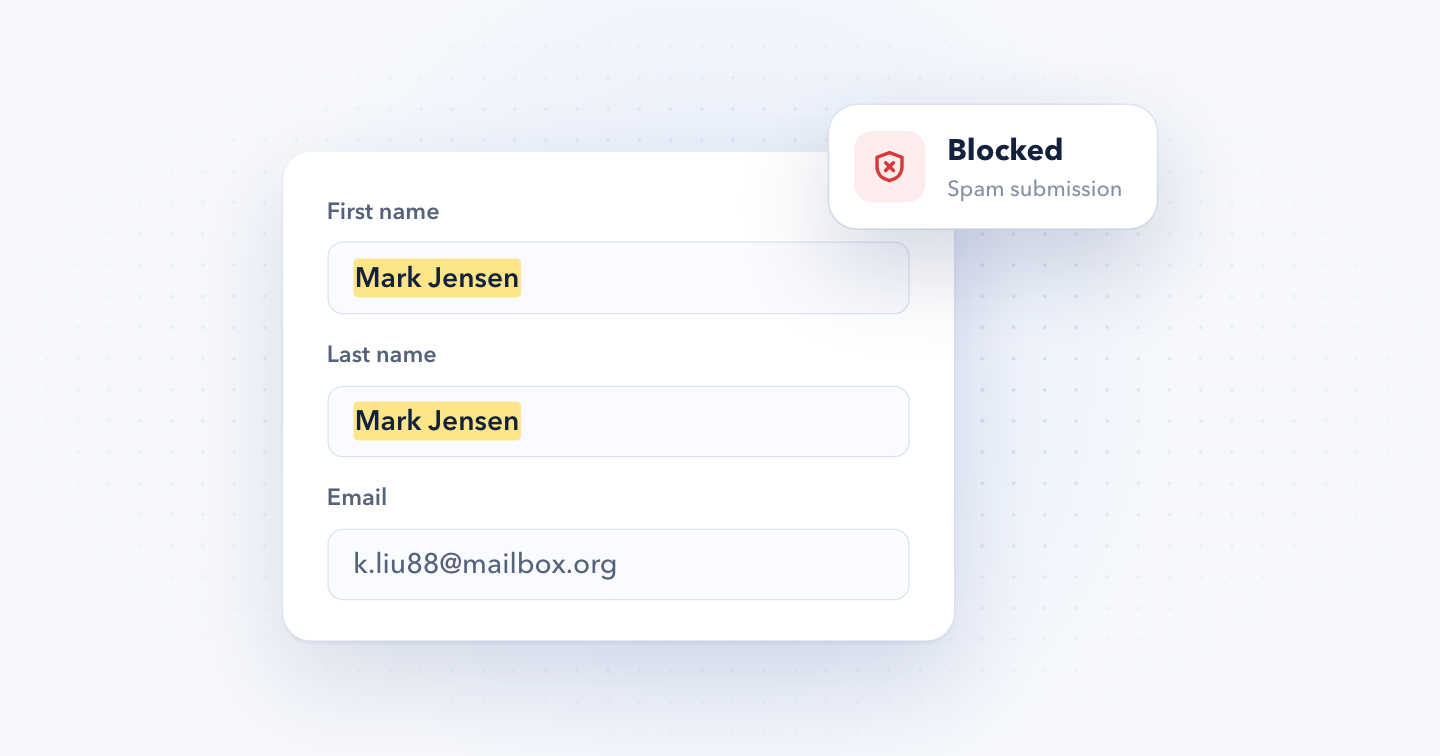
Convert Forms has several layers of spam protection. Below is a short overview of each one with a link to its full doc, followed by fixes for the spam problems we see most often in support.
Spam protection features
- Honeypot: adds a hidden field that bots fill in and people never see. On by default.
- Minimum Time to Submit: blocks submissions sent faster than a person could fill in the form. On by default. If you raised it and spam still gets through, see Spam still gets through after raising the time.
- Captcha: asks visitors to prove they're human before they submit. Choose from hCaptcha, Google reCAPTCHA, Cloudflare Turnstile, ALTCHA or the Math Captcha. Off until you add a captcha field to the form.
- CSRF Token Protection: rejects submissions that don't come from a page on your site, like bots that post straight to the form's submission URL. Off by default.
- Double Opt-in: adds new subscribers to your email list only after they confirm by email.
- Block email addresses or domains: rejects submissions from the addresses or domains you list.
- Block bad words: rejects submissions that contain the words you list.
- Restrict submissions based on IP: rejects submissions from the IP addresses you list.
- Custom validations: rejects submissions that break your own rules.
- Submission Context Tracking: records the IP address, user agent, device and more for every submission, so you can see what spam has in common.
Page caching can keep serving an old copy of the form after you change these settings, so clear your cache once you're done.
The captcha dashboard shows no activity
If your captcha provider's dashboard shows 0 requests while spam keeps arriving, the captcha isn't on the form. Entering the Site Key and Secret Key in Convert Forms' Options only makes the captcha available. You still have to add the captcha field to each form you want to protect, as shown in the hCaptcha, Google reCAPTCHA and Cloudflare Turnstile docs.
Real-looking names with unrelated email addresses
A common pattern on newsletter forms: the First Name field holds a full name, the Last Name field repeats it, and the email address has nothing to do with that name. This is usually subscription bombing. Bots sign real people's email addresses up to hundreds of lists at once, so the flood of welcome emails buries something important in the victim's inbox, like a bank or password alert.
That makes it worse than regular spam. The addresses belong to real people who never signed up, so your welcome emails and automations go to them, they mark you as spam, and your sender reputation drops.
The fix is to enable double opt-in in your email marketing task, so nobody joins your list until they confirm. If you use Brevo, see the Double Opt-In flow.
Spam sent by real people
Captchas, the honeypot and the time check stop bots. They can't stop a person typing into your form by hand. For this kind of spam, block what the submissions share: the same email domains, words or IP addresses. The next two sections show how to find that pattern.
Find patterns with Submission Context Tracking
Open a few spam submissions and compare the details Submission Context Tracking recorded for each. Two values give spam away most often:
- IP address: if the spam comes from the same IP or range, block it with the PHP script in Restrict Form Submissions Based on IP.
- User agent: a bot usually sends the same user agent string with every submission, so you can block that user agent too.
To block a user agent, add this to the form's PHP Scripts → Form Process section, and replace the example strings with the ones you see in your spam submissions:
// User agent strings, or parts of them, to block
$badAgents = [
	'python-requests',
	'HeadlessChrome'
];

// The error message shown when a submission is blocked
$error_message = 'Your submission has been blocked.';

$agent = $_SERVER['HTTP_USER_AGENT'] ?? '';

// Real browsers always send a user agent
if ($agent === '')
{
	throw new Exception($error_message);
}

foreach ($badAgents as $badAgent)
{
	if (stripos($agent, $badAgent) !== false)
	{
		throw new Exception($error_message);
	}
}
The script also blocks submissions with no user agent at all, since real browsers always send one.
Spam that follows a pattern
Sometimes the pattern is in the data itself: the same value in the first and last name fields, a link inside a name field, or text in an alphabet your visitors don't use. You can reject those submissions before they're saved with a custom validation in the form's PHP Scripts.
Still getting spam?
Export a few of the spam submissions from Components → Convert Forms → Submissions, with all their data and context, and send them to our support team. We'll look for the pattern and help you block it.


 Rated: